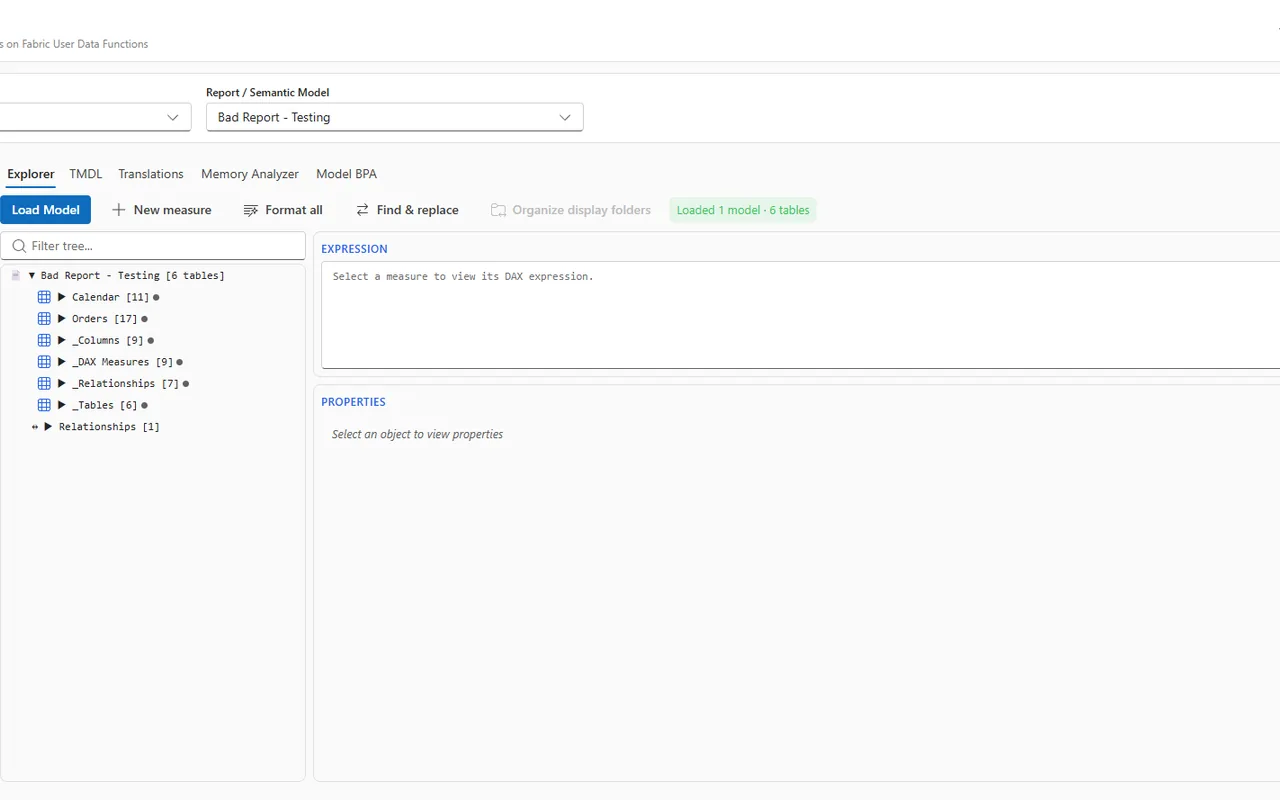
 A Fabric-authenticated React + Vite app that inspects and fixes Power BI
semantic models and reports directly in the browser — no Power BI Desktop, no
Tabular Editor install. It reads model/report definitions through a server-side
Fabric User Data Function proxy, runs a library of Best Practice Analyzer
(BPA) rules, and writes the fixes back as TMDL / PBIR.
A Fabric-authenticated React + Vite app that inspects and fixes Power BI
semantic models and reports directly in the browser — no Power BI Desktop, no
Tabular Editor install. It reads model/report definitions through a server-side
Fabric User Data Function proxy, runs a library of Best Practice Analyzer
(BPA) rules, and writes the fixes back as TMDL / PBIR.
Built on Rayfin — brokered Fabric auth + static hosting, so the whole thing runs as a single Fabric app item with a Python backend.
Screenshots
Add screenshots / a short GIF here before publishing. Suggested captures:
- Home / tool grid — the landing page with the model + report tool tiles.
- Model BPA — a model loaded with BPA findings and one-click fixes.
- Report Explorer — the PBIR tree with the source/diff view open.
- Translations — the GitHub-Copilot-assisted culture translation grid.
Place images under
docs/screenshots/and reference them here, e.g.*(Model BPA — screenshot pending)*.
What it does
Semantic model
- Model Explorer — browse tables, columns, measures, relationships; inline TMDL view.
- Model BPA — Best Practice Analyzer with one-click fixes for common issues.
- Memory Analyzer — column/table size and cardinality insights.
- Measure Editor — edit DAX with a built-in formatter.
- Unused Cleanup, Display Folders, Descriptions, Field Parameters.
- Perspectives, Model Diagram, Metric View migration, Model Documentation.
- Translations — AI-assisted culture translations via GitHub Copilot (device-flow sign-in).
- Batch fixers across multiple models, with a diff preview before write-back.
Reports
- Report Explorer — PBIR tree, source/diff view, pop-out editor window.
- Reverse / Forward Prototype — scaffold and round-trip report layouts.
Automation & ops
- Sempy Runner, Workspace Editor, Jumpstart catalog, Rayfin Apps, Workspace Monitoring one-click deploy.
Architecture
┌─────────────────────────┐     brokered auth      ┌──────────────────────────┐
│  React + Vite SPA        │ ─────────────────────► │  Fabric (this app item)  │
│  (Fluent UI v9)          │                        │  static hosting + auth   │
│  src/                    │                        └──────────────────────────┘
│   ├─ explorer/ pages/    │     HTTPS invoke
│   ├─ components/         │ ─────────────────────► ┌──────────────────────────┐
│   └─ services/  ────────────── udfClient ──────►  │  Python User Data Funcs   │
│        config/udfConfig  │                        │  fabric-udf/function_app  │
└─────────────────────────┘                        │   list_workspaces         │
                                                    │   list_reports            │
                                                    │   apply_report_fixer      │
                                                    │   fabric_proxy (generic)  │
                                                    │   github_device_*/translate│
                                                    └──────────────────────────┘
- The SPA never calls Fabric REST directly — all calls go through the Python
fabric_proxyUDF, which holds the on-behalf-of token server-side (avoids browser CORS and keeps tokens out of the client). - Config is fully env-driven (src/config/udfConfig.ts). No tenant / workspace / capacity ids are hardcoded in source.
Prerequisites
- A Microsoft Fabric workspace on a capacity that supports User Data Functions.
- Node.js 20+ and the repo's package manager (this sample lives in the Rayfin pnpm/rush monorepo — see the root README).
- An Entra app registration (SPA) for brokered auth.
- (Optional) A GitHub Copilot subscription for the AI Translations tool.
Configuration
All runtime config comes from Vite env vars. Copy .env.example to .env and
fill in your values; rayfin env --framework vite generates .env.local
(workspace / item / tenant ids + Rayfin publishable key) automatically.
| Variable | Required | Description |
|---|---|---|
VITE_FABRIC_TENANT_ID |
yes (from .env.local) |
Entra tenant id (auth authority). |
VITE_FABRIC_SPA_CLIENT_ID |
yes | Entra SPA app-registration client id. |
VITE_UDF_LIST_WORKSPACES_URL |
yes | Public URL of the list_workspaces UDF. |
VITE_UDF_LIST_REPORTS_URL |
yes | Public URL of the list_reports UDF. |
VITE_UDF_APPLY_FIXER_URL |
yes | Public URL of the apply_report_fixer UDF. |
VITE_UDF_FABRIC_PROXY_URL |
no | Override for the generic proxy (derived by default). |
VITE_DEMO_WORKSPACE_ID |
no | Source workspace for the monitoring report clone shortcut. |
The app derives the remaining UDF endpoints (
fabric_proxy,github_device_start,github_device_poll,github_translate,github_comment_m) fromVITE_UDF_LIST_WORKSPACES_URL, so you only set the three core URLs.
Deploy your own
Publish the backend functions. Publish the Python UDF in fabric-udf/ as a User Data Functions item in your Fabric workspace (it exposes
list_workspaces,list_reports,apply_report_fixer,fabric_proxy, and the GitHub device-flow / translate functions). Note the item's invoke base URL.Configure env. Copy
.env.example→.envand setVITE_FABRIC_SPA_CLIENT_IDplus the threeVITE_UDF_*_URLvalues to point at your published UDF item.Deploy the app to Fabric:
npm run build:fabric
npm run rayfin:up        # or: rayfin up --workspace-id <your-ws> --tenant <your-tenant> -y
rayfin upprovisions the app item, generates.env.local, and publishes the static bundle. The command prints the live*.webapp.fabricapps.netURL.(Optional) GitHub Copilot translations. The Translations tool uses a GitHub device flow: open the tool, click Sign in with GitHub, enter the shown code at https://github.com/login/device, and authorize. A Copilot subscription is required for the AI captions.
Local development
npm run dev # rayfin env + Vite dev server at http://localhost:5173
Open http://localhost:5173 to view the app. npm run dev
deploys the app services to Fabric (for brokered auth) and starts a local Vite
server pointed at them.
Project structure
├── fabric-udf/
│   ├── function_app.py     # Python User Data Functions (proxy + fixers + GitHub flow)
│   └── requirements.txt
├── rayfin/
│   └── rayfin.yml          # Fabric service config (auth + static hosting)
├── src/
│   ├── main.tsx            # Entry point + Rayfin client bootstrap
│   ├── App.tsx             # Routes + auth gate
│   ├── config/
│   │   └── udfConfig.ts     # Env-driven UDF endpoint config
│   ├── explorer/           # Model/report explorer UI + theme
│   ├── components/         # Tool panels (BPA, Translations, Monitoring, …)
│   ├── pages/              # Top-level routed pages
│   ├── services/           # udfClient, BPA rule engines, TMDL/PBIR helpers
│   └── hooks/              # Auth context + shared hooks
├── .env.example            # Copy to .env and fill in
└── package.json
Scripts
| Command | Description |
|---|---|
npm run dev |
Deploy app services to Fabric and start the local dev server |
npm run build:fabric |
Build for Fabric deployment (tsc -b && vite build) |
npm run rayfin:up |
Deploy the app to Fabric (no local dev server) |
npm run lint |
Lint with ESLint |
npm run test |
Run unit tests with Vitest |
License
MIT © Microsoft Corporation.
Getting started
npm install
npm run dev
npx rayfin up --workspace-id <your-workspace-guid> --tenant <your-tenant-guid>
Any workspace or item id this app needs is read from the environment, with no default.
Data
Credits
Licence: LICENSE. Copyright (c) Microsoft Corporation..