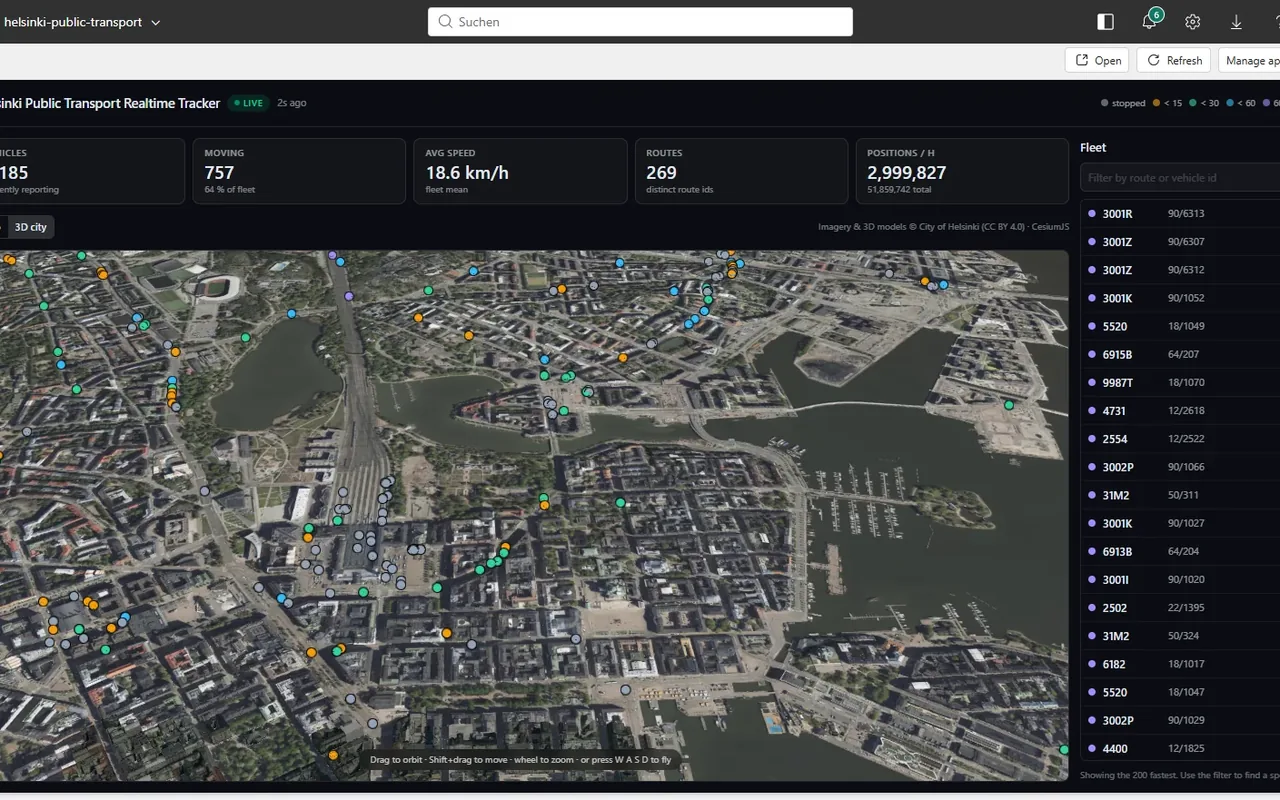
Live map of Helsinki public transport, built as a Microsoft Fabric App (Rayfin) on top of a Real-Time Intelligence stack in Microsoft Fabric.
Credit to Kevin Thomas for the original Helsinki real-time transit solution. This repository is a rebuild of that idea: the same Real-Time Intelligence architecture, and the same Fabric portal host bridge for querying the semantic model. Added here are a token-free 3D city twin and a fallback chain that lets the app also run outside the portal, where there is no host to hand the DAX to.
Vehicle positions come from the public HSL GTFS-RT feeds (Helsingin seudun liikenne). No API key is required.
What it does
- Live tram, bus and metro positions from the public HSL feed
- Eventstream into an Eventhouse, a semantic model over KQL, all inside Fabric
- End-user SSO on the Kusto datasource - every user queries as themselves
- An hourly producer notebook that holds no secrets
Screenshots
Live in the Fabric portal - 1,179 vehicles, no second sign-in, DAX served over the host bridge:

3D city - the same live fleet on the City of Helsinki's textured LoD2 buildings, no Cesium ion
token and no Google Maps key:

Down at street level the vehicles stay on top of the buildings, because they are clamped to the same terrain the buildings sit on:

Architecture
flowchart LR
  HSL["HSL GTFS-RT feeds<br/>vehicle-positions - trip-updates"]
  NB["Notebook<br/>NB_Helsinki_Realtime_Tracker"]
  ES["Eventstream<br/>ES_HSL_Events<br/>(custom endpoint)"]
  EH["Eventhouse HSL_EH<br/>raw_events -> update policies -><br/>vehicle_positions / trip_updates / alerts<br/>+ MV last_vehicle_position"]
  SM["Semantic model HSL_KQL_SM<br/>DirectQuery over Kusto"]
  APP["Fabric App<br/>hsl-realtime-insights<br/>React + Leaflet"]

  HSL -->|"poll 1.2 s / 11 s"| NB --> ES --> EH --> SM -->|"DAX"| APP
The app never talks to Kusto directly - it only ever issues DAX against HSL_KQL_SM, and the
semantic model's Kusto datasource is configured for end-user SSO, so every user reads the
Eventhouse under their own identity.
How the browser reaches the semantic model
src/services/daxGateway.ts picks a transport at runtime and falls through in this order:
| # | Transport | When it applies |
|---|---|---|
| 1 | Fabric host bridge (src/services/fabricHostBridge.ts) |
The app is embedded in the Fabric portal. The portal exposes a postMessage channel (fabric-app-data-semantic-model, method semanticModel.executeDaxJson) and runs the DAX server-side as the signed-in portal user. No second sign-in, no token in the browser. |
| 2 | Rayfin connector (fabric-semanticmodel) |
Server-side execution through the Rayfin backend, using the ids in rayfin/rayfin.yml. Experimental SDK surface. |
| 3 | Power BI REST (src/services/powerBiDirect.ts) |
The app is opened standalone, outside the portal. MSAL acquires a Power BI token - silent SSO first, interactive only if that fails - and calls executeQueries. |
The host bridge is tried first on purpose: inside the portal it is both the fastest path and the only one that does not ask the user to sign in a second time.
The 3D city view
The 3D city mode renders vehicles on the City of Helsinki's own semantic city model - with no
Cesium ion token and no Google Maps API key. Every layer is CC BY 4.0 open data streamed straight
from kartta.hel.fi, which sends CORS headers, so nothing has to be re-hosted or baked:
| Layer | Source |
|---|---|
| Textured semantic LoD2 buildings | CityGML converted to 3D Tiles |
| Terrain | quantized-mesh (2021) |
| Base imagery | Ortoilmakuva_2025_5cm orthophoto WMS, 5 cm/px |
One surface, not four
The city also publishes photogrammetric reality meshes for 2015, 2017 and 2024, and all three were
wired up here at one point - 2017 was offered in the UI as Photoreal. They are gone, for a reason
that outranks how good the photogrammetry looks: vehicles are clamped to the terrain, not to the
mesh. The mesh surface sits several metres above the terrain, so close in the vehicles sank under
the buildings and disappeared. A transit map that hides the transit when you zoom in is not a
feature with a trade-off; it is broken.
The cost argument points the same way. Measured from an identical view on a cold cache:
| Surface | Settles in | GPU memory | Frame rate while loading |
|---|---|---|---|
| Mesh 2017 | 7.9 s | 52 MB | 47.6 |
| Mesh 2024 | 10.6 s | 406 MB | 35.9 |
| Mesh 2015 | 2.0 s | 53 MB | 48.8 |
| CityGML buildings | 2.5 s | 57 MB | 47.3 |
The tree tileset went with them. It was a second network round trip and a second set of tiles for canopy that reads as green mush from any altitude the app is actually flown at.
Tuning was not the lever: with a cold cache and the same view, maximumScreenSpaceError
16 / 24 / 32 settled in 13.7 s / 12.1 s / 12.9 s, and skipLevelOfDetail made it worse. The time
goes on fetching tiles from kartta.hel.fi. Nor are the vehicles a cost - 1,420 ground-clamped
points render at the same 60 fps as 120.
Why the buildings are tinted
Not every building in Helsinki's CityGML dataset carries facade textures. The untextured ones ship
a plain white material, and lit by the sun next to their dark-roofed textured neighbours they read
as glaring white boxes - which is exactly what "why are the buildings grey?" looks like from the
outside. The tileset therefore carries a Cesium3DTileStyle that multiplies everything by a warm
stone tint (BUILDING_TINT). Multiply is the right operator here: it barely touches a textured
facade, and it drops the blank ones into masonry.
Cesium's default credit is the Cesium ion logo, which would be misleading here - Ion.defaultAccessToken
is blanked, the credit container is hidden, and attribution is rendered in the app chrome instead.
Attribution: Source: 3D models of Helsinki, Helsingin kaupunginkanslia, CC BY 4.0.
A Cesium ion / Google Photorealistic 3D Tiles variant is deliberately not wired up - it swaps a free licence-clean source for a metered one, and it would reintroduce the clamping problem above.
Layout
| Path | What |
|---|---|
src/data/queries.ts |
the three DAX queries the app issues |
src/data/model.ts |
row decoding ([alias] vs 'Table'[alias] keys) and domain types |
src/hooks/useDaxQuery.ts |
generic polling DAX hook (reschedules after each response) |
src/hooks/useFleet.ts |
vehicles, fleet stats, counters, selected-vehicle track |
src/services/daxGateway.ts |
transport selection - host bridge, connector, Power BI REST |
src/services/fabricHostBridge.ts |
postMessage DAX bridge used when embedded in the portal |
src/services/powerBiDirect.ts |
MSAL + executeQueries fallback for standalone use |
src/components/MapView.tsx |
Leaflet map; markers are moved, not rebuilt, each poll |
src/components/CesiumView.tsx |
token-free 3D scene over the Helsinki open geodata |
src/cesium/helsinkiOpenData.ts |
every Helsinki endpoint, in one place |
src/dev/CesiumPreview.tsx |
dev-only 3D harness (see below) |
scripts/copy-cesium.mjs |
copies Cesium's runtime assets into public/cesium/ |
rayfin/rayfin.yml |
services + the hslModel connector declaration |
rayfin/connectors/schema.ts |
typed connector schema for the SDK |
fabric/ |
definitions of the Fabric items backing the app |
fabric/deploy/ |
scripted, idempotent provisioning of those items (see Deploy) |
tools/verify_publishable.py |
audits the repo for tenant-specific values before publishing |
docs/publishing.md |
what to change to contribute this to awesome-rayfin |
Develop
npm install
npm run dev      # rayfin up (backend only) + vite
The 3D scene can be checked without going through Fabric sign-in:
npm run cesium:assets
node node_modules/vite/bin/vite.js . --port 5199
# then open http://localhost:5199/?preview=cesium
That harness renders CesiumView with synthetic vehicles. It is guarded by import.meta.env.DEV,
so it is compiled out of production builds.
Deploy
The app is one of two halves. The back end (Eventhouse, Eventstream, producer notebook,
semantic model) has to exist first; the front end is then a single rayfin up.
Back end
fabric/deploy/ provisions everything from the definitions in fabric/. The scripts need nothing
but Python 3.10+ and the Azure CLI - no SDK, no secrets. Each one is idempotent: it looks for an
existing item by display name and updates rather than duplicating, so a failed run can simply be
repeated. Ids are recorded in fabric/deploy/.state.json and picked up by the following steps.
az login --tenant <tenant-id>

$env:FABRIC_TENANT_ID    = "<tenant-id>"
$env:FABRIC_WORKSPACE_ID = "<workspace-id>"
$env:FABRIC_FOLDER_ID    = "<folder-id>"   # optional

cd fabric/deploy
python 01_eventhouse.py        # Eventhouse + KQL database, records the cluster URI
python 02_kql_schema.py        # tables, parse functions, update policies, the MV
python 03_eventstream.py       # custom endpoint -> Eventhouse, fresh node GUIDs
python 04_notebook.py          # producer notebook, eventstream ids patched in
python 05_semantic_model.py    # TMDL repointed at the new cluster and database
python 06_bind_credentials.py  # <- the step everything else depends on
python 07_schedule.py          # hourly trigger for the notebook
python 09_verify.py            # end-to-end check
Step 6 is the one that is easy to miss. Without it executeQueries returns HTTP 400
DatasetExecuteQueriesError and the app shows zeros with no useful message. It takes ownership of
the dataset, seeds the gateway datasource with a real Kusto token, then switches it to end-user
SSO so nothing stored can expire.
Step 8 is optional and only matters for the standalone sign-in path:
$env:PBI_CLIENT_ID = "<spa-app-registration-id>"
$env:APP_ORIGINS   = "https://<app>.webapp.fabricapps.net,http://localhost:5173"
python 08_entra_redirects.py
Inside the Fabric portal the host bridge is used and no token is acquired in the browser at all, so that step can be skipped entirely.
09_verify.py checks the eventstream topology, Kusto freshness and the app's own DAX, in that
order. If it reports a node that is not Running, re-run it with --resume: pausing the capacity
pauses the Eventhouse destination, and resuming the capacity does not resume it - the producer
keeps running and the events have nowhere to land.
fabric/eventhouse/RealTimeDashboard.json is not provisioned by any of these steps. It is a
Real-Time Dashboard the app does not depend on; import it by hand if you want it.
Front end
npx rayfin up --workspace-id <workspace-id> --tenant <tenant-id> -y
Point the app at the model created above via VITE_PBI_DATASET_ID (see .env.example) and the
connector entry in rayfin/rayfin.yml.
Deploying a second instance into another workspace
The same front end can run against an existing back end in a different workspace - or a different
tenant - without disturbing the first deployment. rayfin/.deployments.json keys each deployment
by workspace name, so both coexist.
npx rayfin up --workspace-id <other-workspace-id> --tenant <other-tenant-id> -y
Two things have to be pointed at the other workspace's semantic model before the build, because they are baked into the bundle:
VITE_PBI_DATASET_ID- put it in.env.production.local, which Vite loads after the generated.env.localand therefore wins.VITE_FABRIC_WORKSPACE_IDneeds no attention: the CLI writes it before it builds.connectors.hslModel.configinrayfin/rayfin.yml.
Afterwards the CLI leaves rayfin/.env, .env.local and the active deployment pointing at the
new target. Restore them if the original workspace should stay the default.
Scripts
| Command | What it does |
|---|---|
npm run dev |
rayfin up (backend only) + Vite dev server on 5173 |
npm run build |
TypeScript project build + Vite production build |
npm run build:fabric |
Same, but copies the Cesium runtime assets first - used by Fabric static hosting |
npm run cesium:assets |
Copies Cesium's Assets/ThirdParty/Widgets/Workers into public/cesium/ |
npm run lint |
ESLint 9 flat config |
npm test |
Vitest unit tests |
npm run preview |
Serves the production build locally |
Licence and attribution
MIT, see LICENSE. The app renders open data it does not own - the HSL GTFS-RT feed and the City of Helsinki 3D city model, both CC BY 4.0, both fetched live from the publisher. See NOTICE.md.
Notes
- The producer notebook runs on an hourly schedule with a 58 min runtime budget, so runs hand over without overlapping. It also stands down if an older run is still active.
- The notebook holds no secrets: it resolves the Eventstream connection string at run time from
GET /v1/workspaces/{ws}/eventstreams/{id}/sources/{sourceId}/connectionusing its own identity. - The semantic model's Kusto datasource uses end-user SSO, so every app user queries the Eventhouse under their own identity and no stored token can expire.
- Requires Rayfin 1.34.0-beta.1 or newer - the semantic model connector runtime does not exist in 1.33.x.
- CesiumJS is code-split into its own chunk, so opening the default 2D map never downloads it.
public/cesium/is generated byscripts/copy-cesium.mjsand git-ignored.vite-plugin-cesiumsetsCESIUM_BASE_URLbut does not serve those files in dev, which makes Cesium parse Vite's SPA fallback HTML as JSON and die - hence the explicit copy.
Getting started
npm install
npm run dev
npx rayfin up --workspace-id <your-workspace-guid> --tenant <your-tenant-guid>
Any workspace or item id this app needs is read from the environment, with no default.
Project structure
docs/           documentation and diagrams
fabric/         Fabric item definitions (report, semantic model, eventhouse)
rayfin/         deployment config - redirect URIs are loopback only
scripts/        operational scripts
src/            the application
Data
Sources and their licences are listed in NOTICE.md.
Credits
Third-party data and licences: NOTICE.md. Licence: LICENSE. Copyright (c) Microsoft Corporation..