This is Fran Genoa's project. The original work, the design, the voxel vessel twins and the Real-Time Intelligence architecture are his: FranGenoa/fabric-harbour-pulse. It sits in this gallery with his name on it, not instead of it.
The ferry photographs are Wikimedia Commons contributors' work, several under CC BY-SA — each credited individually in ATTRIBUTION.md, as those licences require.

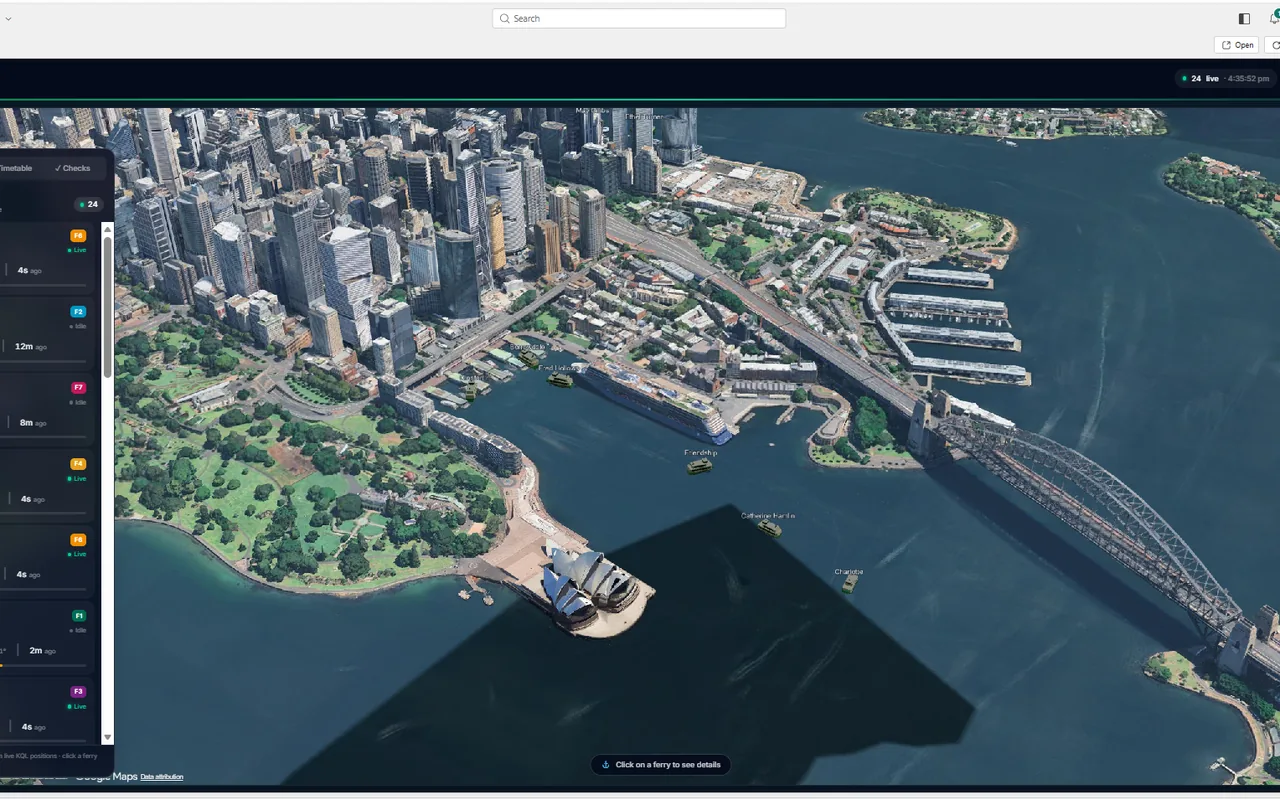
A photorealistic 3D map of Sydney Harbour that renders live ferry positions from a Fabric Real-Time Intelligence Eventhouse, plus a voxel digital twin of any vessel you click. Built as a Rayfin Fabric App: React 19 + Vite + Cesium in the browser, Fabric SSO for identity, Fabric SQL for operator checklists, and Fabric static hosting to serve it.
It runs inside the Fabric portal on the user's existing Fabric identity — no separate hosting, no separate login, no separate access review. One provisioning script stands the whole thing up in a tenant you own.
What it does
- Live tracking — polls the latest position per ferry every few seconds and animates each vessel across the harbour. Heading is derived from movement; the TfNSW feed has no bearing field.
- Photoreal 3D globe — Google Photorealistic 3D Tiles and Cesium OSM Buildings when a Cesium Ion token is present, falling back to keyless OpenStreetMap imagery and extruded building footprints otherwise.
- Digital twin — click a ferry for a full-screen voxel vessel with decks, wheelhouse and passengers, sized by per-deck occupancy.
- Vessel checks — a pre-departure / in-service operator checklist written to Fabric SQL, immediately reportable and joinable to the telemetry.
- Fleet and timetable — a live fleet list you can fly the camera to, and today's TfNSW scheduled departures.
Positions are real. Occupancy is simulated. TfNSW publishes vessel position, bearing, speed and stop, but no passenger counts — the
occupancy_statusfield in its GTFS-realtime feed is empty for every ferry. The twin renders whatever is inFerryTwinTelemetryand falls back to a client-side simulation when that table is empty, so swapping in a real people-counting feed needs no front-end change.
Why it matters in a business
An operator usually already has this data. What it tends to lack is one place to see it and a way to ask questions across it.
- One live picture instead of three systems. Position, timetable and vessel condition sit in the same store, so "which vessels are running late and have an open defect" is a query rather than a morning spent reconciling exports.
- On-time running becomes measurable. Every position is retained beside the scheduled departures, so adherence can be trended by route, vessel or time of day instead of inferred from complaints.
- Checks become evidence. Pre-departure inspections are written as structured rows rather than paper or a shared spreadsheet — attributable, auditable, and joinable to the telemetry, so you can see whether a recurring defect tracks with usage.
- Crowding can drive decisions. The twin already renders per-deck occupancy; point it at a real people-counting feed and vessel allocation, crowding alerts and demand reporting follow with no front-end change.
- Incidents can be replayed. History is kept, so reconstructing where a vessel was, and when, does not depend on someone's recollection.
- No new platform to govern. It runs inside Fabric on the user's existing identity: no separate hosting bill, no second login, no extra access review. The tenant controls that already cover the data cover the app — which is usually what decides whether something like this ships at all.
The shape is not ferry-specific. Anything emitting position or condition telemetry — buses, trucks, plant, field crews — fits the same pattern: a real-time store, a live operational view, a digital twin, and operator write-back that lands next to the telemetry it describes.
Deploy it to your own Fabric tenant
This is the main path. One script does almost everything; the manual parts are two permission grants and starting the data flowing. Budget about 30 minutes the first time, most of it waiting.
Before you start
Accounts and roles. You need a Fabric tenant and someone with the roles below. It does not have to be the same person for all of them — steps 1–4 and 6 need the first and last, step 5 needs an administrator.
| To do this | You need |
|---|---|
| Create the Fabric workspace | Contributor on a Fabric capacity (F-SKU or trial), and a tenant that allows workspace creation |
| Register the sign-in app | Application Developer in Microsoft Entra — or the tenant setting Users can register applications set to Yes |
| Approve that app for everyone | Cloud Application Administrator or higher |
| Give people access to the data | Admin or Member on the new workspace |
Tools on your machine. Install these first:
| Tool | Version | Check with |
|---|---|---|
| Node.js | 20 or newer | node --version |
| Python | 3.11 or newer | python --version |
| Azure CLI | any current | az --version |
| PowerShell | 7 or newer | pwsh --version |
Three values to collect. Have these to hand before you start:
| Value | Where to find it |
|---|---|
| Tenant id | Run az account show --query tenantId -o tsv |
| Capacity id | Fabric portal → Settings → Admin portal → Capacity settings → click your capacity → the GUID is in the browser address bar |
| Workspace name | Whatever you want to call it, e.g. Harbour Pulse. It is created if it does not exist. |
Step 1 — get the repo and its dependencies
git clone <this repo>
cd fabric-harbour-pulse
npm ci
pip install -r fabric/requirements.txt
Step 2 — get two free API keys
Both are free and take a couple of minutes each.
| Key | How to get it |
|---|---|
| TfNSW API key | Sign up at opendata.transport.nsw.gov.au → My Account → Applications → Create Application → tick the Public Transport – Realtime and Timetables APIs → copy the key. |
| Cesium Ion token | Sign up at ion.cesium.com → Access Tokens → copy the default token. Optional — without it the globe still works with plain OpenStreetMap imagery. |
Copy .env.example to .env and paste them in:
VITE_CESIUM_ION_TOKEN=<your Cesium token>
TFNSW_API_KEY=<your TfNSW key>
Leave everything else blank — step 4 fills it in. .env is git-ignored; keep
it that way.
Do this before step 4, not after. The deployed timetable is baked into the JavaScript bundle at build time, because static hosting has no server to hold an API key at runtime. If the key is missing when the build runs, the Timetable panel deploys empty.
You now have everything you need. Pick how you want to finish:
| Deploy it yourself | Carry on with steps 3–7 below. Around twenty minutes, most of it waiting on Fabric. You will run four commands and click through two permission grants. |
| Ask an AI agent to deploy it | Hand the whole thing to Copilot or Claude Code. The repo ships a skill that walks the agent through it, so you only answer questions and do the two clicks an agent cannot do for you. |
Both routes end at the same place, and the agent route still needs you present for the permission grants in step 5 — a consent prompt is deliberately a human decision.
Step 3 — sign in
az login --tenant <your tenant id>
Then confirm it actually worked:
az ad signed-in-user show --query userPrincipalName -o tsv
If that errors — especially with TokenCreatedWithOutdatedPolicies — sign in
again with an explicit scope:
az login --tenant <your tenant id> --scope 'https://graph.microsoft.com//.default'
The doubled slash in //.default is not a typo. With a single slash the Azure
CLI recognises the scope, finds the cached token and returns without prompting
you — which is useless when the cached token is precisely the problem.
Step 4 — run the provisioning script
./scripts/provision-environment.ps1 `
    -TenantId      <your tenant id> `
    -WorkspaceName 'Harbour Pulse' `
    -CapacityId    <your capacity id>
This takes 10–20 minutes. It:
- Creates the workspace, or reuses it if the name already exists.
- Registers a Microsoft Entra app so the browser can fetch data — see the sign-in app for what it is and why.
- Publishes every Fabric item: Eventhouse, KQL database, Eventstream, loader notebook, dashboard and lakehouse.
- Writes the generated cluster URI and app ids back into your
.env. - Seeds
Files/.envin the lakehouse so the loader notebook can authenticate. - Builds and deploys the app, then registers its new URL as a valid sign-in redirect.
It is safe to re-run. If it fails partway, run it again rather than
patching by hand. It deletes nothing unless you explicitly pass
-PruneOrphans.
When it finishes it prints your hosting URL. Keep it.
Step 5 — grant the two permissions
The app has no server of its own: each user's browser queries the Eventhouse directly using that user's own identity. That is what keeps Fabric's permissions in charge, and it is why two grants are needed once per tenant.
a) Approve the sign-in app for your organisation.
Entra admin center → Entra ID → App registrations →
HarbourPulse Kusto Client→ API permissions → Grant admin consent for <tenant>
Needs Cloud Application Administrator or higher. Without it, every first-time user hits an "approval required" screen and stops.
The app asks for nothing up front and requests its data permission on demand, so the permission may only appear in that list after someone has signed in once. If the list is empty, open the app, sign in, then come back.
b) Give people read access to the data.
Fabric portal → your workspace →
SydneyFerriesKustoDB→ Manage permissions → add users as Viewer
Anyone with Member or Admin on the workspace already has this. Without it, sign-in succeeds and every query silently returns 403.
Step 6 — start the data flowing
The Eventhouse is created empty. Open your workspace and run the
SydneyFerriesEventLoader notebook.
It polls TfNSW every 15 seconds and pushes into the Eventstream, then stops itself after 10 minutes so a forgotten notebook cannot hold a Spark session open. While it runs its status stays "not started" even though it is working — judge it by rows, not status. Give it a couple of minutes (a cold Spark session is slow to start), then check in the KQL database:
SydneyFerries
| summarize rows = count(), vessels = dcount(ferry_name), latest = max(timestamp)
Re-run the cell whenever you want more data. To change the limit, edit
RUN_MINUTES in the last cell — 0 means run until stopped.
Stopping it early. The notebook holds a Spark session, which consumes capacity until it is released, so stop it when you are done:
- In the notebook — press the stop button beside the running cell, then Session ready in the bottom-left corner → Stop session. Stopping the cell alone leaves the session alive and still billing.
- From the workspace — Fabric portal → Monitor hub → filter Item type = Notebook → find the run with status Running → Cancel.
An idle session also expires on its own after 20 minutes, but that timer only starts once nothing is executing — a running loop keeps it alive indefinitely, which is why the 10-minute limit exists.
For unattended running, put the notebook on a Fabric schedule instead of leaving a session open.
Step 7 — check it works
Open the hosting URL.
Expect the first connection to be blocked. Inside the Fabric portal the app cannot always get an Eventhouse token silently, so the header offers Connect live data, which opens a second sign-in window. On a first visit there is no cached account to sign in with, so that window is a fresh pop-up — and the browser blocks it. It looks as though the button did nothing.
When that happens:
- Allow pop-ups for the site — the blocked-pop-up icon sits at the right-hand end of the address bar.
- Press Connect live data again.
The second attempt goes through. Later visits reuse the account and usually connect without asking. Until it succeeds the globe still draws, but anything fed by the Eventhouse stays empty — no ferries, and the vessel picker in Checks shows a placeholder instead of the fleet.
Then confirm:
- ferries are moving on the globe,
- the Timetable panel lists departures,
- clicking a ferry opens the voxel twin with passengers on the decks,
- a vessel check can be saved and deleted.
No wharf markers is expected. The ReferenceLocation table is created
empty and this repo ships no wharf rows for it.
If something goes wrong
| What you see | What it means |
|---|---|
| Connect live data seems to do nothing | The sign-in pop-up was blocked. Allow pop-ups for the site and press it again — step 7. |
TokenCreatedWithOutdatedPolicies, or a Graph error right after a successful login |
Stale cached token. Redo step 3 with the doubled-slash scope. |
The script fails near the end with a bare 500 uploading static content |
Known transient in the upload service. The script retries once; if it still fails run npx rayfin up staticapp deploy. Nothing else needs redoing. |
| Everything loads but there is no data, and the browser console shows 403 | Missing Viewer on the KQL database — step 5b. |
| "Approval required" on first sign-in | Missing admin consent — step 5a. |
| Globe fine, no ferries | The loader notebook is not running — step 6. |
| Vessel picker in Checks stays empty | Not connected yet (step 7), or SydneyFerries has no rows yet (step 6). The placeholder text says which. |
| Timetable panel empty | TFNSW_API_KEY was unset when the bundle was built. Set it in .env and re-run step 4. |
| Globe looks flat and grey | No Cesium Ion token. Harmless — it fell back to OpenStreetMap. |
The sign-in app
The Entra app registration the script creates (HarbourPulse Kusto Client) is
a public SPA client. It holds no secret and grants nothing on its own — it
is only the thing that lets a browser ask for a token on the signed-in user's
behalf. Every query still runs as that user, against their own Fabric
permissions.
| Setting | Value | Why |
|---|---|---|
| Platform | Single-page application | Browser-based, so tokens use PKCE and no client secret exists |
| Sign-in audience | Single tenant | Only your organisation's accounts |
| Redirect URIs | Your hosting URL, plus http://localhost:5173 |
Patched automatically after each deploy |
| API permission | Kusto user_impersonation, delegated |
Query the Eventhouse as the signed-in user |
| Client secret | none | It is a public client — a secret in a browser is not a secret |
Two independent redirect-URI lists exist and both must contain the hosting URL:
services.auth.allowedRedirectUris in rayfin/rayfin.yml
for Fabric SSO, and the SPA redirect URIs on the app registration for the
Eventhouse token. The script maintains both. Deploying a brand new app mints
a new random hostname, so both need refreshing — which re-running the script
does.
Deploying changes later
Once the environment exists you rarely need the full script.
npm run rayfin:up                      # app only (frontend + auth + data)

$env:FABRIC_WORKSPACE_ID = '<workspace guid>'
python fabric/deploy.py                # Fabric artefacts only
fabric/parameter.yml is what makes the Fabric side portable: workspace id,
Eventhouse and KQL database ids, lakehouse id and cluster URI are all resolved
against the target workspace at publish time, so no item definition ever
needs hand-editing.
Rebuild at least fortnightly. The timetable is a 14-day snapshot baked in at build time, so it ages out and the Timetable panel eventually empties. See Roadmap for the fix.
Deploying with an AI coding agent
The repo ships a skill at
.agents/skills/deploy-harbourpulse/
covering this whole procedure, including the failure modes worth knowing about.
Agents that read .agents/skills — GitHub Copilot in VS Code, Claude Code and
similar — pick it up automatically from a clone. Say "deploy this repo to my
Fabric tenant" and supply the three values from
Before you start.
How it works
System overview
flowchart LR
    subgraph Browser["Browser — React 19 + Vite SPA"]
        UI["HomePage / SidePanel"]
        Cesium["CesiumView (3D globe)"]
        Voxel["FerryVoxelView (digital twin)"]
        Svc["ferryService / twinService<br/>checklistService"]
        Kusto["kustoClient (MSAL)"]
    end

    subgraph Fabric["Microsoft Fabric"]
        SSO["Rayfin auth (Fabric SSO)"]
        Data["Rayfin data (Fabric SQL)<br/>VesselCheck"]
        Static["Static hosting"]
        EH[("Eventhouse<br/>SydneyFerriesKustoDB")]
        NB["SydneyFerriesEventLoader"]
    end

    TfNSW["TfNSW GTFS-realtime"] --> NB --> EH
    UI --> Cesium --> Svc
    UI --> Voxel --> Svc
    Svc -->|"vessel checks"| Data
    Svc -->|"positions, wharves, occupancy"| Kusto -->|"user's own token"| EH
    UI --> SSO
    Static -. serves .-> Browser
Live positions and wharves always come from the Eventhouse. Fabric SQL is used only for the vessel-check capture feature.
Data path — three modes
The service layer picks its transport at runtime, so only the plumbing changes between environments:
flowchart TB
    Feed["ferryService / twinService"]
    Feed --> Mode{"where is it<br/>running?"}

    Mode -->|"deployed (portal iframe<br/>or standalone tab)"| Direct["queryKusto() direct"]
    Direct --> MSAL["MSAL token<br/>user_impersonation<br/>(NAA broker, else sign-in)"]
    MSAL --> EH2[("Eventhouse KQL<br/>CORS-enabled")]

    Mode -->|"localhost (dev)"| DevAPI["GET /api/… (Vite middleware)"]
    DevAPI --> AzCli["AzureCliCredential<br/>(az login)"]
    AzCli --> EH1[("Eventhouse KQL")]

    Checks["checklistService"] -->|"Fabric portal"| Rayfin["RayfinClient GraphQL<br/>(portal session)"]
    Rayfin --> DAB[("Rayfin data<br/>VesselCheck")]
- Fabric portal (embedded) — positions and wharves are read straight from the Eventhouse (kustoClient.ts). Nested App Auth lets the portal broker the Kusto token silently where it can; otherwise the header shows a one-time Connect live data button, which is a second sign-in on top of the Fabric session. Vessel checks go through the Rayfin data service (rayfinClient.ts) on the portal session.
- Deployed standalone — a plain browser tab queries the Eventhouse directly with an MSAL access token for the signed-in user. The Eventhouse allows CORS from the app origin.
- Local dev — a dev-only Vite middleware (vite/ferryApi.ts)
queries the Eventhouse with your
az loginidentity and exposes a same-origin JSON API. No CORS, no browser tokens.
Authentication
App identity and live-data access are two separate things, which is the part that usually surprises people:
flowchart TB
    Boot["bootstrap.ts"] --> Local{"frontend on<br/>localhost?"}
    Local -->|yes| Guest["GuestAuthService<br/>(no Fabric popup)"]
    Local -->|no| Rayfin["RayfinAuthService<br/>(Fabric SSO)"]
    Guest --> Gate["AuthGuard / AuthContext"]
    Rayfin --> Gate
    Gate --> Home["HomePage (protected)"]
    Home -->|"Connect live data"| Interactive["connectDataInteractive()<br/>MSAL redirect/silent"]
    Interactive --> Token["cached token → direct KQL"]
Signing in gets you into the app. Reading the Eventhouse needs a second token, scoped to Kusto and carrying your own identity — the app never holds a service credential on your behalf. That is why Connect live data exists in a standalone tab and never appears inside the Fabric portal, where the portal session can be brokered silently.
Data in the Eventhouse
Eventhouse SydneyFerriesEventhouse → KQL database SydneyFerriesKustoDB.
| Table | Columns |
|---|---|
SydneyFerries |
ferry_name, ferry_lat, ferry_long, ferry_destination, timestamp |
ReferenceLocation |
LocationId, LocationName, Latitude, Longitude, ProximityThreshold |
FerryTwinTelemetry |
OpenTelemetry metrics — MetricName, MetricValue, VesselId, DeckId, Attributes, Timestamp |
Latest position per active ferry, anchored to the newest sample so the map stays populated if the feed pauses:
SydneyFerries
| summarize arg_max(timestamp, *) by ferry_name
| where timestamp > todatetime('<latest>') - 15m
| project ferry_name, ferry_lat, ferry_long, ferry_destination, timestamp
Digital twin

Clicking a ferry opens FerryVoxelView.tsx: a Three.js voxel vessel whose decks are populated from occupancy telemetry, with crew and passenger cards and the vessel checklist inline.
twinService.ts reads the latest value per deck
from FerryTwinTelemetry and falls back to a client-side simulation when the
table is absent or empty — which today is always, because nothing writes to it.
Occupancy is therefore invented in the browser and consistent per vessel, not
real. Anything that ingests the OpenTelemetry metrics shape into that table
(MetricName = ferry.deck.occupancy, capacity in the attributes) makes the
decks real with no front-end change. See Roadmap.
flowchart LR
    Producer["any producer<br/>(nothing today)"] -. "OTel metric<br/>ferry.deck.occupancy" .-> EH[("Eventhouse<br/>FerryTwinTelemetry")]
    EH -->|"latest value per deck"| Twin["twinService.ts"]
    Fallback["client-side simulation<br/>(seeded per vessel)"] -->|"used when the<br/>table is empty"| Twin
    Twin --> Voxel["FerryVoxelView<br/>voxel decks + passengers"]
Frontend module map
flowchart TB
    main["main.tsx<br/>(bootstrap + client)"] --> App["App.tsx<br/>(routes + AuthGuard)"]
    App --> AuthPage["AuthPage.tsx"]
    App --> Home["HomePage.tsx"]
    Home --> CesiumView["CesiumView.tsx"]
    Home --> Voxel["FerryVoxelView.tsx"]
    Home --> SidePanel["SidePanel.tsx"]
    SidePanel --> Fleet["FleetPanel.tsx (live)"]
    SidePanel --> Sched["SchedulePanel.tsx (GTFS)"]
    SidePanel --> Check["ChecklistPanel.tsx (Rayfin data)"]
    Voxel --> ChecksCard["VesselChecksCard.tsx"]
    CesiumView --> ferrySvc["services/ferryService.ts"]
    Voxel --> twinSvc["services/twinService.ts"]
    Check --> checkSvc["services/checklistService.ts"]
    ferrySvc --> kusto["services/kustoClient.ts"]
    ferrySvc --> rc["services/rayfinClient.ts"]
    ferrySvc --> contract["shared/contract.ts"]
Renderers: CesiumView.tsx is the harbour view and FerryVoxelView.tsx the digital twin. The Three.js building blocks they share live in src/three/.
Rayfin services
Configured in rayfin/rayfin.yml:
| Service | Enabled | Notes |
|---|---|---|
auth |
yes | Fabric SSO + password |
data |
yes | Data API Builder, mssql — the VesselCheck entity only |
staticHosting |
yes | Serves dist/ via npm run build:fabric |
storage, functions |
no | Not used |
Run locally
For development only. Everything above is how you ship it.
az login          # as a user with read access to SydneyFerriesKustoDB
npm run dev
Open http://localhost:5173.
npm run dev regenerates env vars, deploys the backend services excluding
static hosting, then serves the frontend. Ferry data comes from the Vite dev
middleware (vite/ferryApi.ts), which exposes:
| Route | Returns |
|---|---|
GET /api/ferries/live |
Latest position per active ferry |
GET /api/ferries/fleet |
Full vessel roster — backs the vessel-checks picker |
GET /api/reference-locations |
Wharves |
GET /api/ferries/schedule |
Today's departures. Accepts ?scope=all and ?limit=N |
Environment variables
VITE_* values are generated by rayfin env --framework vite; override them
in .env.
| Variable | Purpose |
|---|---|
VITE_KUSTO_CLUSTER, VITE_KUSTO_DATABASE |
Eventhouse target |
VITE_ENTRA_CLIENT_ID, VITE_ENTRA_TENANT_ID |
Sign-in app for the Eventhouse token |
VITE_KUSTO_SCOPE |
Token-scope override (default <cluster>/user_impersonation) |
VITE_CESIUM_ION_TOKEN |
Cesium Ion token — 3D Tiles, OSM Buildings, terrain |
VITE_FERRY_API, VITE_FERRY_MODEL_URL |
Data API base, ferry .glb override |
VITE_RAYFIN_PUBLISHABLE_KEY, VITE_FABRIC_WORKSPACE_ID |
Rayfin / Fabric SSO |
TFNSW_API_KEY |
TfNSW key. Server-side only — no VITE_ prefix |
KUSTO_CLUSTER_URI, KUSTO_DATABASE, FERRY_ACTIVE_WINDOW |
Dev middleware overrides |
Scripts
| Command | Description |
|---|---|
npm run dev |
Deploy backend services, start the dev server |
npm run build |
Production build (tsc -b && vite build) |
npm run build:fabric |
Build for Fabric static hosting |
npm run build:ferry |
Rebuild the bundled ferry .glb |
npm run lint / npm run test |
ESLint / Vitest |
npm run rayfin:up |
Deploy all Rayfin services to Fabric |
Project structure
├── scripts/                           # provision-environment.ps1, build-ferry-glb.mjs
├── .agents/skills/                    # Agent skills (deployment, Rayfin)
├── .github/workflows/                 # Rayfin and Fabric deploy pipelines
├── fabric/                            # Fabric artefacts + deploy.py + parameter.yml
├── rayfin/                            # Fabric service config + data entities
├── vite/                              # Dev KQL API, GTFS builder, timetable snapshot
├── public/                            # Ferry photos, bundled .glb models
├── docs/screenshots/                  # README images
└── src/
    ├── components/                    # CesiumView, FerryVoxelView, side panels
    ├── services/                      # Data layer, auth, Kusto and Rayfin clients
    ├── hooks/                         # Auth context
    ├── pages/                         # HomePage
    ├── shared/                        # Types, config, geo helpers
    ├── three/                         # Voxel ferry models and harbour backdrop
    └── __tests__/                     # Vitest specs
Roadmap
Self-refreshing timetable. The deployed timetable is a build-time snapshot of 14 service days, so it ages out. Cheapest first:
- Rebuild weekly. A
schedule:trigger on 30_deploy_rayfin.yml keeps the snapshot under a week old against a 14-day horizon. Four lines of YAML. - Ingest the timetable into the Eventhouse. The preferred fix. A sibling of
the loader notebook pointed at
/v1/gtfs/schedule/ferries/sydneyferrieswould landtrips,stop_times,routes,stopsandcalendaras KQL tables daily. The join indeparturesForDay(vite/gtfsSchedule.ts) ports almost line-for-line to a KQL function, and the browser then reads departures over the existing Kusto path — no new auth, no new CORS surface. It also removesTFNSW_API_KEYfrom the build entirely, cutting the secret locations from three to two. Land each service day as a replace, not an append.
A data function to remove the Eventhouse grant. Today every user needs
Viewer on SydneyFerriesKustoDB or the map returns 403, because the browser
queries Kusto with that user's own token. A Fabric User Data Function
holding the same queries would run under one identity and make step 5b
disappear. Note that VITE_FERRY_API alone is not enough to switch: in a
deployed build useDirectKusto in
ferryService.ts short-circuits to the direct
path whenever the Kusto vars are present, so this needs an explicit preference
flag too. Fabric User Data Functions are in preview, and browser CORS against
the function endpoint is the open question.
Real occupancy data. Per-deck counts are simulated because TfNSW publishes
none. The table schema is the contract — point a real people-counting feed at
FerryTwinTelemetry and the voxel twin renders it with no front-end change.
One home for vessel checks. Standalone builds write checks to
localStorage; inside the Fabric portal they go to Fabric SQL. The two never
reconcile. Reading through to the backend whenever an authenticated Rayfin
client exists would collapse them.
Wharf markers. ReferenceLocation ships empty. TfNSW stops.txt from the
GTFS schedule bundle is the obvious source.
Licence and attribution
Harbour Pulse is Fran Genoa's project. The upstream repository is FranGenoa/fabric-harbour-pulse, and the design, the voxel vessel twins and the Real-Time Intelligence architecture are his work. This folder exists in the gallery with his name on it, not instead of it.
Source code is MIT — see LICENSE. It does not cover the ferry photographs, map data or map tiles, which keep their own licences: see ATTRIBUTION.md for per-image authors and terms, and note that several photos are CC BY-SA (share-alike).
Security notes and reporting: SECURITY.md.
About the identifiers in this repo. The workspace, capacity, tenant, Entra client and Eventhouse cluster ids have been replaced with placeholders such as
<source-workspace-id>and<your-eventhouse>.kusto.fabric.microsoft.comon the way into this gallery.provision-environment.ps1fills in your own when you deploy.
Fabric architecture
npx rayfin up provisions:
- Entra sign-in (Fabric identity)
- Fabric SQL database
- Static web app
Getting started
npm install
npm run dev
npx rayfin up --workspace-id <your-workspace-guid> --tenant <your-tenant-guid>
Any workspace or item id this app needs is read from the environment, with no default.
Data
Live vessel positions come from the Transport for NSW open real-time feed, streamed into a Fabric Eventhouse. The base map is Google Photorealistic 3D Tiles and Cesium OSM Buildings. Ferry photographs are from Wikimedia Commons under their own licences — see ATTRIBUTION.md.
Credits
- Fran Genoa — original project and upstream repository: FranGenoa/fabric-harbour-pulse
- Ferry photographs — Wikimedia Commons contributors, credited individually with author, licence and source page in ATTRIBUTION.md. Several are CC BY-SA, so the share-alike terms travel with them.
- Transport for NSW — open real-time vessel positions.
- Licence: LICENSE. Copyright (c) 2026 HarbourPulse contributors.