Power BI Fixer — The Fabric App Edition.
A Browser-Based Power BI Workbench.

A Fabric-authenticated React app that inspects, edits, and fixes Power BI semantic models and reports — directly in the browser. Deploy it once on your Fabric capacity and share it with your whole team.

# Deploy as a single Fabric app item
rayfin up  # sign in, then start working.
🌐 Runs in the Browser ✓ Free & Open Source ☁ Single Fabric App Item ⚛ React + Fluent UI ✓ No Local Install

Built on Rayfin · reads & writes TMDL / PBIR via a Python User Data Function proxy

🚧 Beta — Use at Your Own Risk. The Fabric App edition is in active development. Test on a non-production workspace first. Found a bug? Ping me on LinkedIn.

Two Ways to Run PBI Fixer

The same mission — scan, fix, and explore Power BI — in two editions. You're viewing the Fabric App edition.

📓
Fabric Notebook

Notebook Edition

Built on Semantic Link Labs — one line of Python in a Microsoft Fabric Notebook. An ipywidgets UI with 50+ fixers across 12 tabs. No install, no deploy.

from sempy_labs import pbi_fixer
pbi_fixer()
  • Best for individuals & ad-hoc fixing
  • Runs inside any Fabric Notebook
  • Standalone Python API for pipelines
Explore the Notebook Edition →
🌐
★ You're viewing this

Fabric App Edition

Built on Rayfin — a Fabric-authenticated React app deployed once for your whole team. Reads and writes TMDL / PBIR through a Python backend. No local install.

# Deploy as a Fabric app item
rayfin up
  • ★ Everything the Notebook does — all 12 tabs & 50+ fixers
  • Best for teams & shared governance
  • Team Best-Practice Guidelines & Survey ★
  • AI cleanup, Workspace Editor, IBCS visual
Get Started ↓
1
Fabric App Item
0
Local Installs
2
Layers: Model & Report
Team Members
0
License Cost

A Genuine Browser-Based Modelling Workbench

It covers the core model-editing surface people rely on from desktop editors — and adds a full report layer, a free IBCS custom visual, and AI-assisted cleanup you won't find even in paid tooling. ★ marks the top picks.

📄

Semantic Model Editing

Edit your tabular model with full access to all properties — and a lot more.

  • ★ Edit all properties — display folders, descriptions, field parameters, perspectives, translations
  • DAX Formatter, data preview, Model Adder (calc groups, tables, info views)
  • Model Diagram — live ER diagram with layout, zoom, hidden-object toggles
  • Unused Cleanup & Metric View Migration (Unity Catalog → Direct Lake)
  • Model BPA & Memory Analyzer with batch one-click fixes
  • ★ Pre-Warm Direct Lake caching for faster queries
📊

Report Editing

Edit and extend your report — fix, prototype, and document.

  • ★ PBIR View — browse and edit the report definition (tree, source / diff, pop-out editor)
  • Reverse / Forward Prototype — scaffold and round-trip report layouts
  • IBCS rules & Report BPA — bring visuals in line with the standards
  • ★ Add a free, notation-correct IBCS custom visual — no marketplace purchase
  • ★ Generate a whole-model documentation page & an AI landing page
🤖

AI-Assisted Cleanup

Runs on your own Copilot subscription via a once-off GitHub device-flow sign-in.

  • ★ Translations — culture translations for captions and descriptions
  • ★ Descriptions — consistent object descriptions across the model
  • ★ Display-Folder Organisation — propose a clean, consistent folder structure
  • Diff preview — every fix shows the exact TMDL / PBIR change before it is written
⚙️

Automation & Ops

One-click deploy and workspace tooling.

  • ★ Sempy Runner and Builder
  • ★ Workspace Editor — reorganise items into folders with AI, mass-delete
  • ★ Jumpstart Catalog & Awesome Rayfin Apps Catalog
  • Workspace Monitoring
  • History & Undo — every write-back tracked and reversible

Everything the Notebook Does — Plus More

The Fabric App edition is a complete superset of the Semantic Link Labs notebook. Every one of the notebook's 12 tabs and 50+ fixers is here — now running in your browser and shared across your whole team — plus features the notebook never had. App only marks what's new in the Fabric App edition.

Fix All

One-click scan & fix across all categories — report fixers, model fixers, Model BPA, and Report BPA. Grouped results with selective execution.

📄

Model Explorer

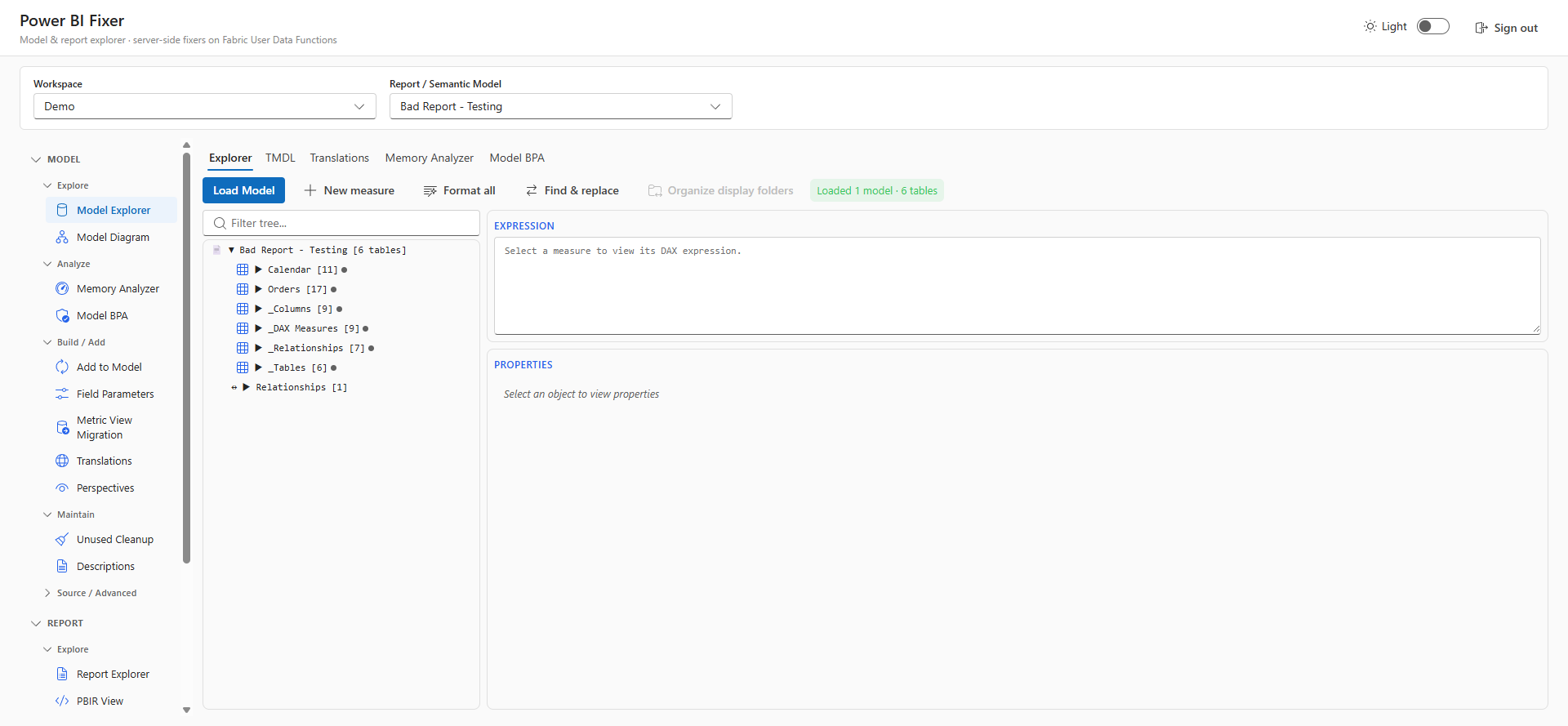
Browse tables, columns, measures, hierarchies, and relationships. Edit DAX, properties, and display folders. Create measures, calculated columns, and tables.

📊

Report Explorer

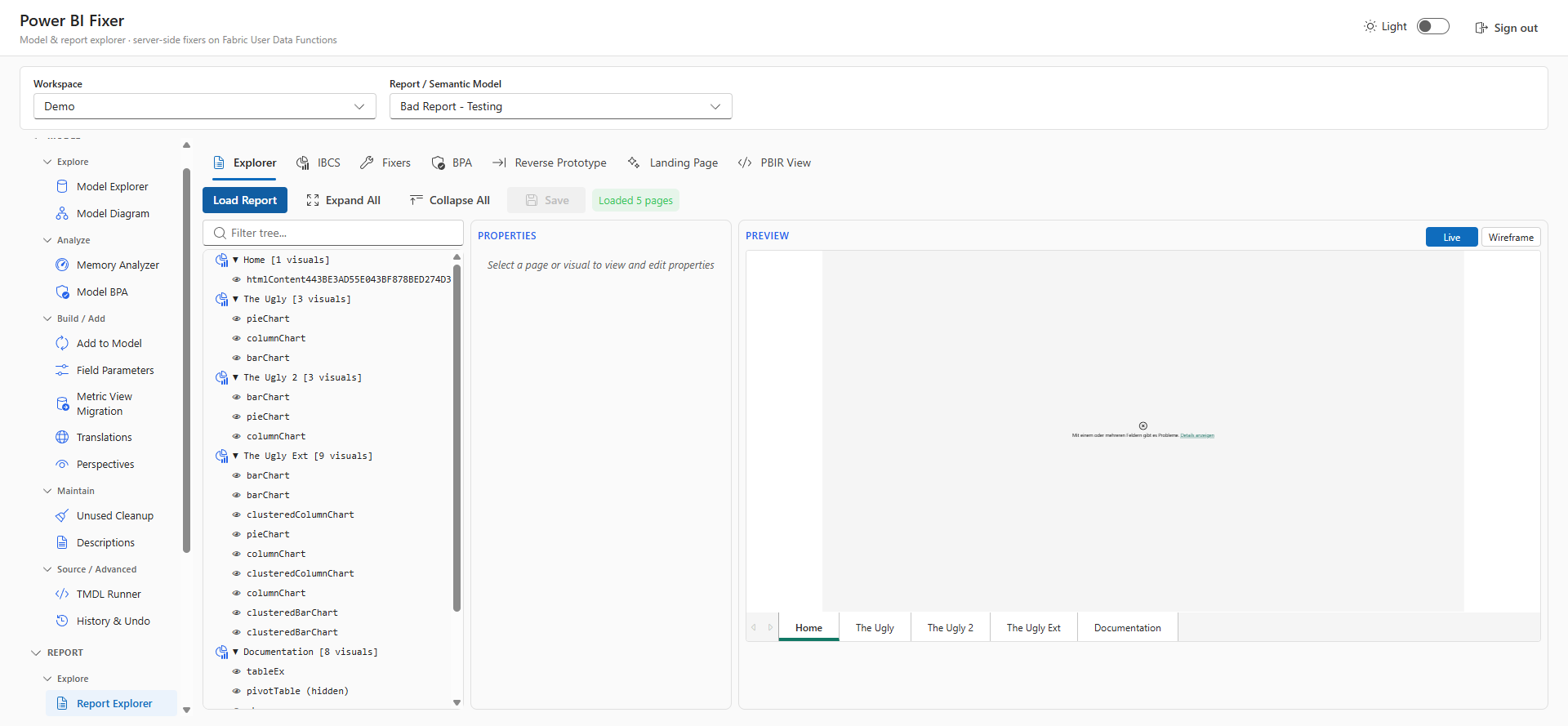
Navigate report pages & visuals with live preview. Scan for violations, fix chart formatting, convert to PBIR, and align visuals.

👁

Perspectives

Create, edit, and delete model perspectives with tri-state checkboxes. Visual table-level summaries with one-click save.

🌐

Translations

Manage metadata translations across all model objects. One-click auto-translate — in the app, powered by your own Copilot, no API key.

💾

Memory Analyzer

Vertipaq statistics broken down by tables, columns, partitions, relationships. Color-coded size bars, cardinality, encoding, Direct Lake support.

📋

Model BPA

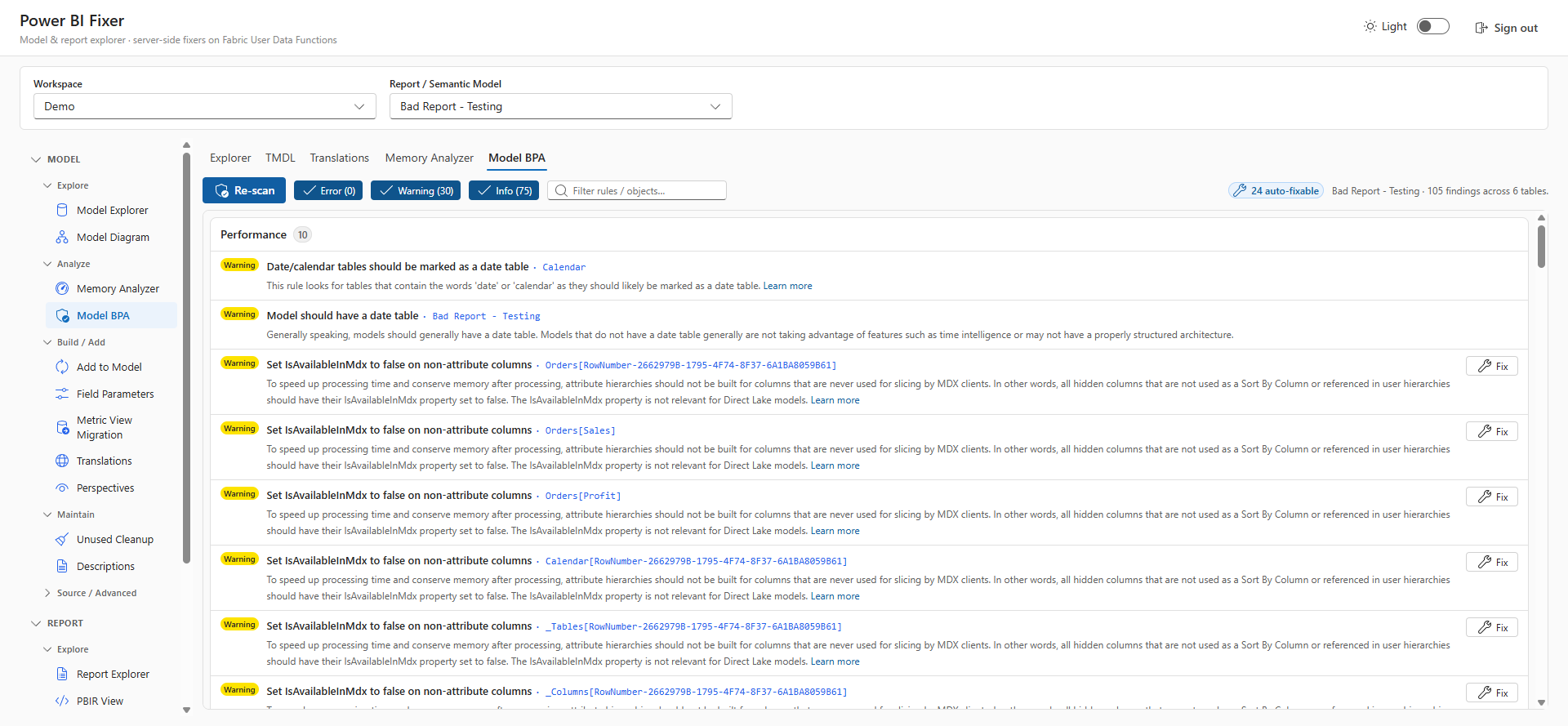
19 best practice rules across 6 categories with one-click auto-fix. 15 rules have no equivalent auto-fix in any other tool.

📄

Report BPA

Report-level best practice analysis with automatic PBIRLegacy-to-PBIR conversion. Catches unused custom visuals, report-level measures, and more.

📐

Delta Analyzer

Inspect delta table structure — parquet files, row groups, column chunks, and column statistics. Essential for Direct Lake optimization.

🧪

Prototype

Generate report prototypes and whole-model documentation pages. Export layouts and round-trip them with Reverse Prototype.

🗺

Model Diagram

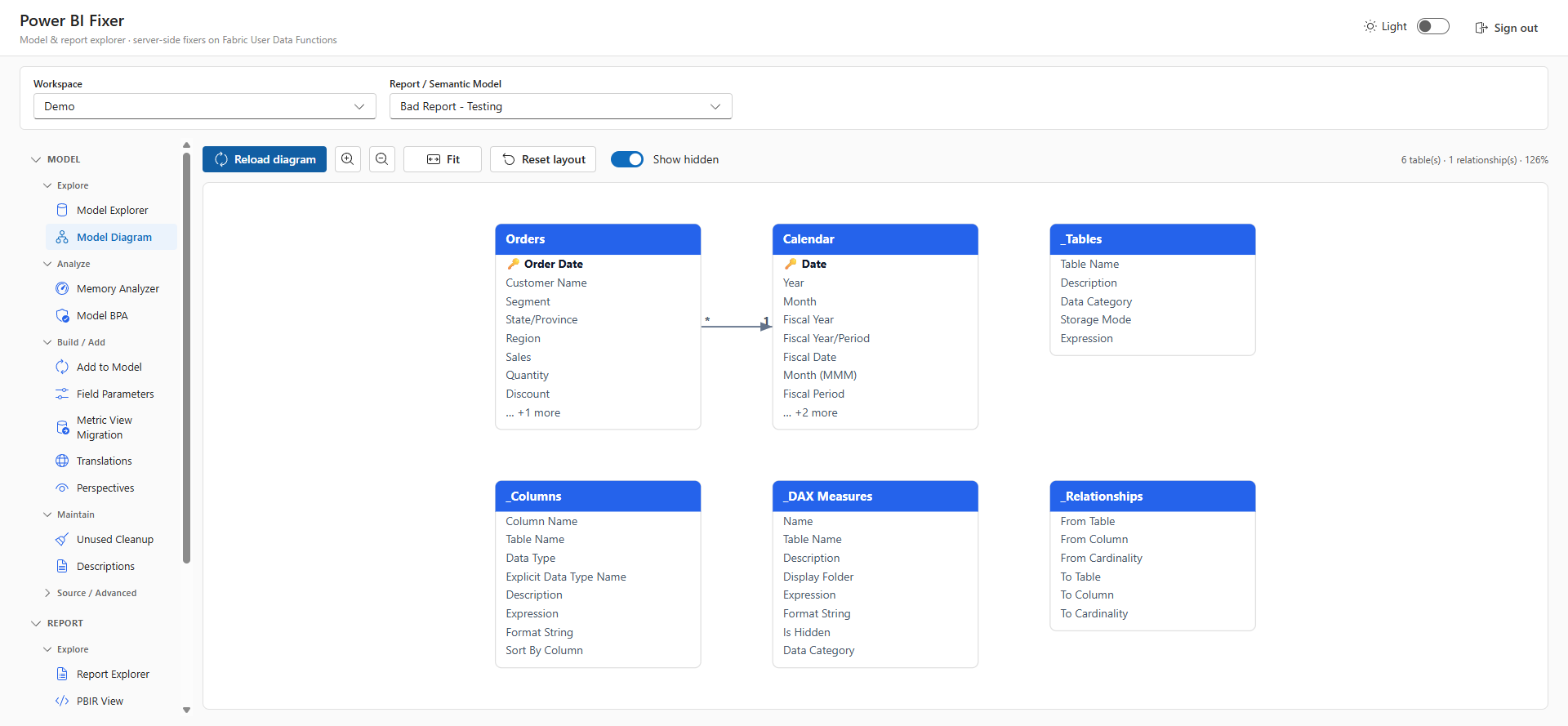
Live ER relationship diagram with table boxes, columns, measures, layout, zoom, and hidden-object toggles.

ℹ️

About

Version info, credits, and links to the source code and documentation.

App only · Headline feature ⭐

Team Best-Practice Guidelines & Survey

A guided questionnaire captures your team's Power BI conventions and syncs them to OneLake as an in-app Guidelines view — one shared, living standard for everyone who opens the app.

App only
🔁

Reverse Prototype

Turn an existing report back into an editable prototype scaffold — full round-trip between live reports and layouts.

App only
🧾

TMDL & PBIR View

Edit the raw model (TMDL) and report (PBIR) definitions directly in the browser — Power BI Desktop "TMDL view" parity, with source & diff.

App only · Top pick ⭐
🌍

Translation Editor with AI

Generate culture translations for captions and descriptions across the whole model via your own Copilot (GitHub device-flow). Diff preview before every write-back.

App only · Top pick ⭐
📝

AI Descriptions

Auto-generate consistent object descriptions across the model with your own Copilot. Diff preview before every write-back.

App only · Top pick ⭐
📁

AI Display-Folder Organisation

Propose a clean, consistent display-folder structure for measures and columns with your own Copilot. Diff preview before every write-back.

App only · Top pick ⭐
🗂

Workspace Editor

Reorganise workspace items into folders with AI, mass-rename, and mass-delete — tidy an entire workspace in one place.

App only
📡

Workspace Monitoring

A guided wizard that deploys and configures Fabric workspace monitoring without leaving the app.

App only · Top pick ⭐

Sempy Runner

Run Semantic Link / TMSL / C# / Python against your items, or scaffold a ready-to-run Fabric notebook in one click.

App only
🔗

Metric View Migration

Migrate Databricks Unity Catalog metric views straight into a Direct Lake semantic model.

App only
📦

Awesome Rayfin Catalog

Browse and deploy curated Awesome Rayfin apps into your workspace in a single click.

App only
🚀

Jumpstart Catalog

Deploy curated Fabric jumpstart solutions into your workspace in a single click.

App only · Top pick ⭐
📊

Free IBCS Custom Visual

Add a notation-correct IBCS custom visual to any report — bundled in, no marketplace purchase required.

App only
🔥

Pre-Warm Direct Lake

Warm Direct Lake column caching ahead of time so the first user queries return fast.

App only
👥

Shared Team Deployment

Deploy once on your Fabric capacity and share with the whole team — same app, no local install, central guidelines.

See It in Action

A visual tour through the app. Screenshots use sample semantic models and reports.

🧭 The App Shell

One unified shell — model and report tooling grouped in a single left-hand navigation, with light and dark themes.

  • Sign in with your Fabric identity
  • Model layer & report layer side by side
  • Consistent Fluent UI v9 experience
Power BI Fixer app shell with model and report tooling in Fluent UI

📄 Model Explorer

Edit your tabular model — browse tables, columns, and measures through a fully editable property grid, with inline TMDL, data preview, refresh, and DAX formatting.

  • Full object tree with display folders
  • Inline TMDL editing & live properties pane
  • One-click organise actions
Model Explorer showing table tree, inline TMDL, and properties pane

📋 Model BPA

The Best Practice Analyzer with per-rule findings, severity chips, and one-click fixes for findings the engine can repair automatically.

  • Per-rule findings with severity chips
  • One-click and batch auto-fixes
  • Diff preview before every write-back
Model Best Practice Analyzer with per-rule findings and one-click fixes

💾 Memory Analyzer

VertiPaq analysis that finds the columns eating your model size — column and table size plus cardinality insights, with auto-fixable findings to shrink the model.

  • Column / table size breakdown
  • Cardinality insights
  • Auto-fixable findings to shrink models
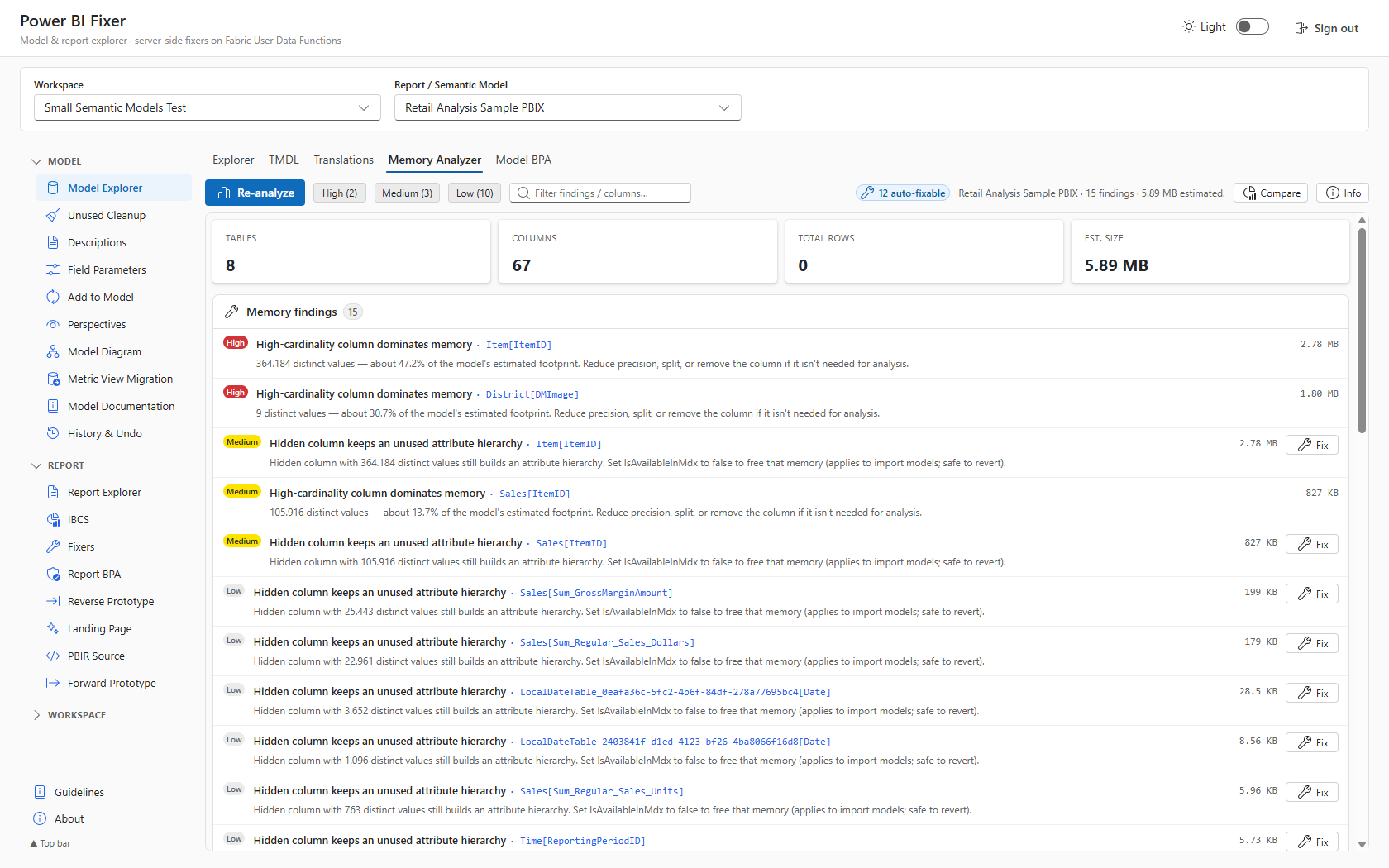
Memory Analyzer showing column and table size and cardinality insights

🔥 Direct Lake pre-warm

Warm the Direct Lake cache on Fabric so the very first user query hits a hot cache instead of a cold one — straight from the Model Explorer toolbar.

  • Detects Direct Lake models automatically
  • Run on Fabric now, or create + open the notebook
  • Builds a cache-warming pass over resident columns
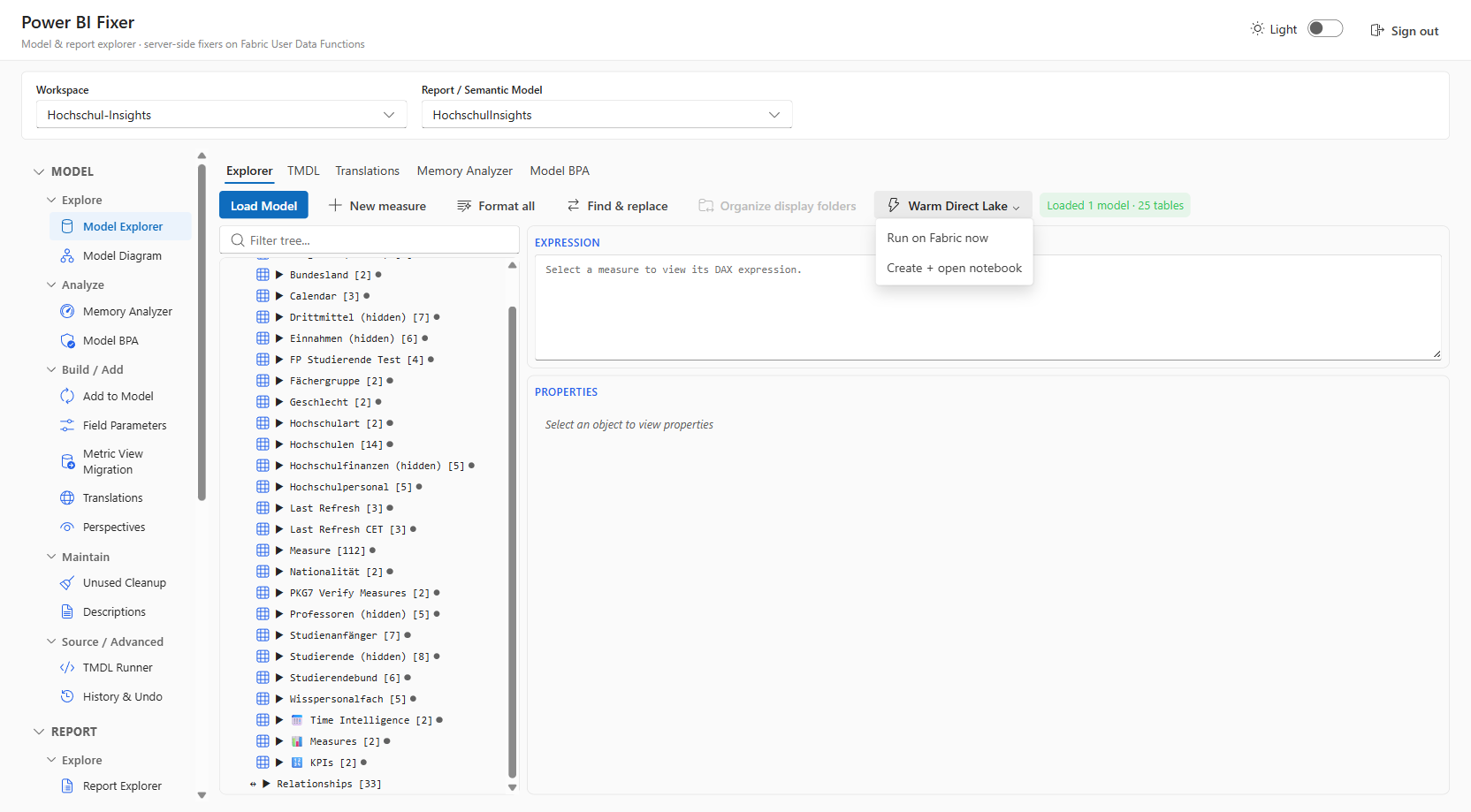
Warm Direct Lake menu in the Model Explorer toolbar pre-loading columns into cache

🗺 Model Diagram

See tables and relationships at a glance — a live ER diagram with layout, zoom, and hidden-object toggles.

  • Live entity-relationship diagram
  • Layout & zoom controls
  • Hidden-object toggles
Live ER diagram of tables and relationships with layout and zoom

📊 Report Explorer

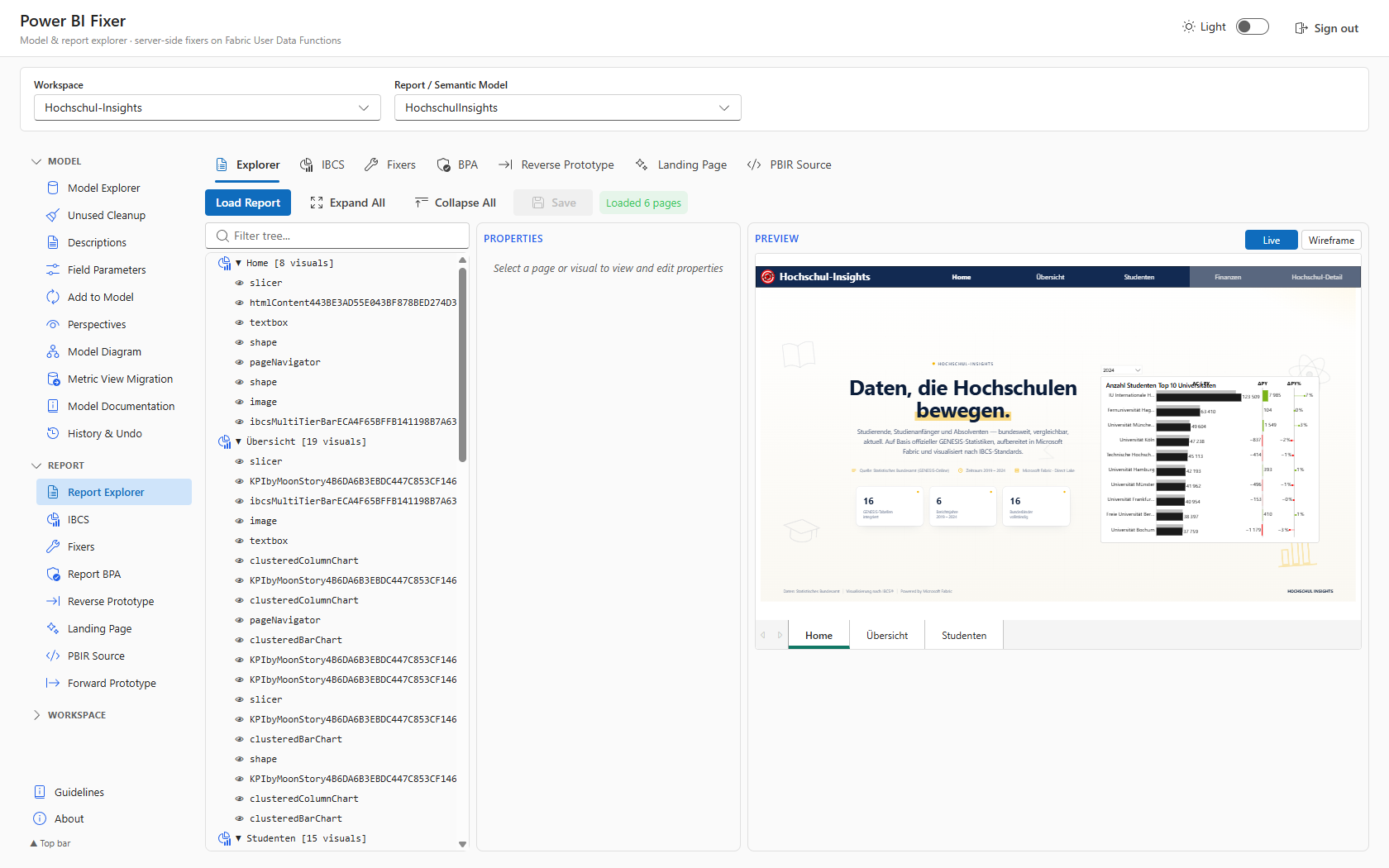
Walk pages, visuals, and their properties in one place — the PBIR tree with a live / wireframe report preview and an editable properties pane.

  • PBIR tree navigation
  • Live / wireframe report preview
  • Editable properties pane
Report Explorer with PBIR tree, live preview, and properties pane

⚡ IBCS Builder

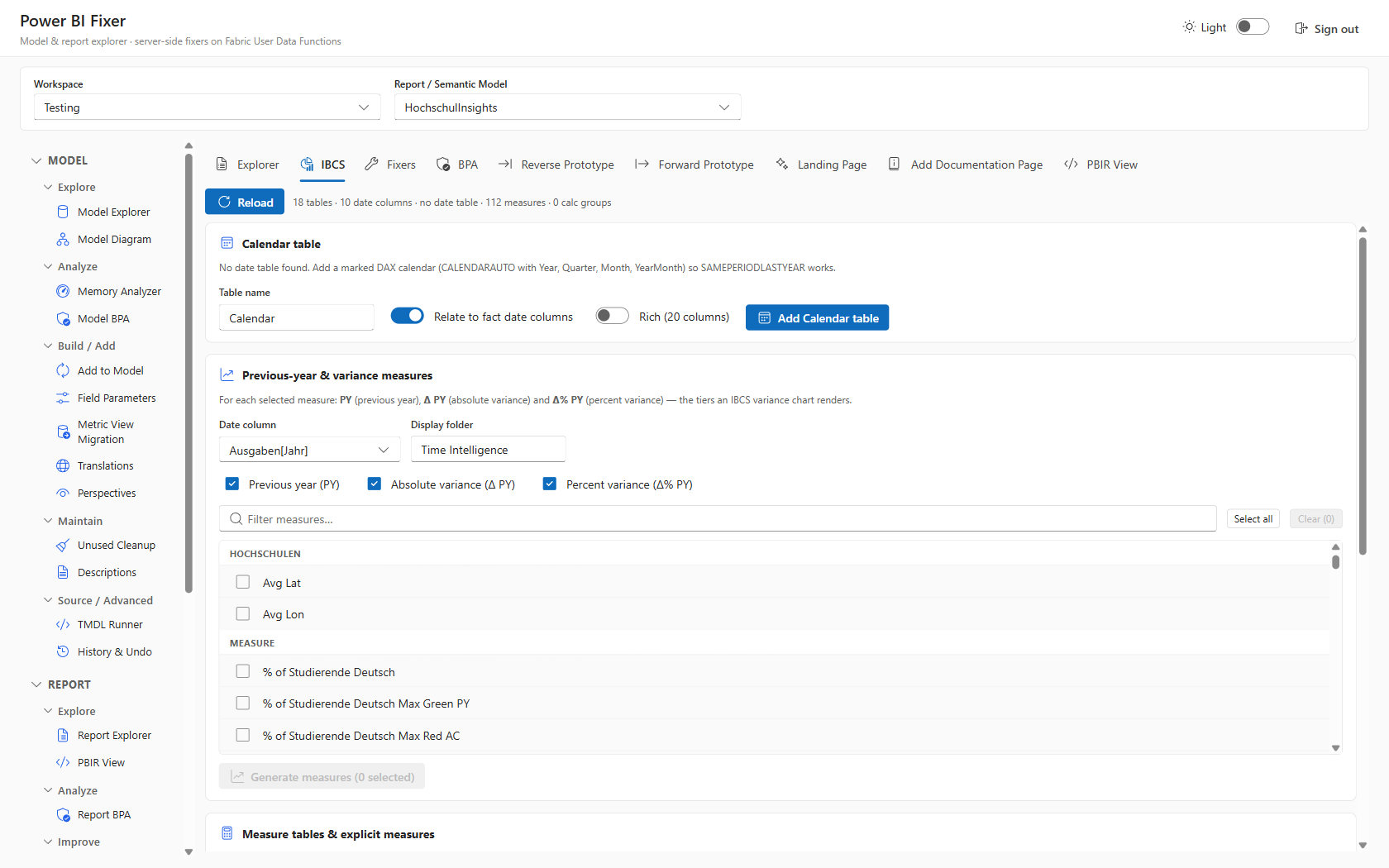
Standards-compliant calendar and measures in a few clicks — add a marked calendar table and generate previous-year & variance measures (PY, Δ PY, Δ% PY) that drive IBCS variance charts.

  • Add a marked calendar table
  • Generate PY, Δ PY, Δ% PY measures
  • Drive notation-correct IBCS variance charts
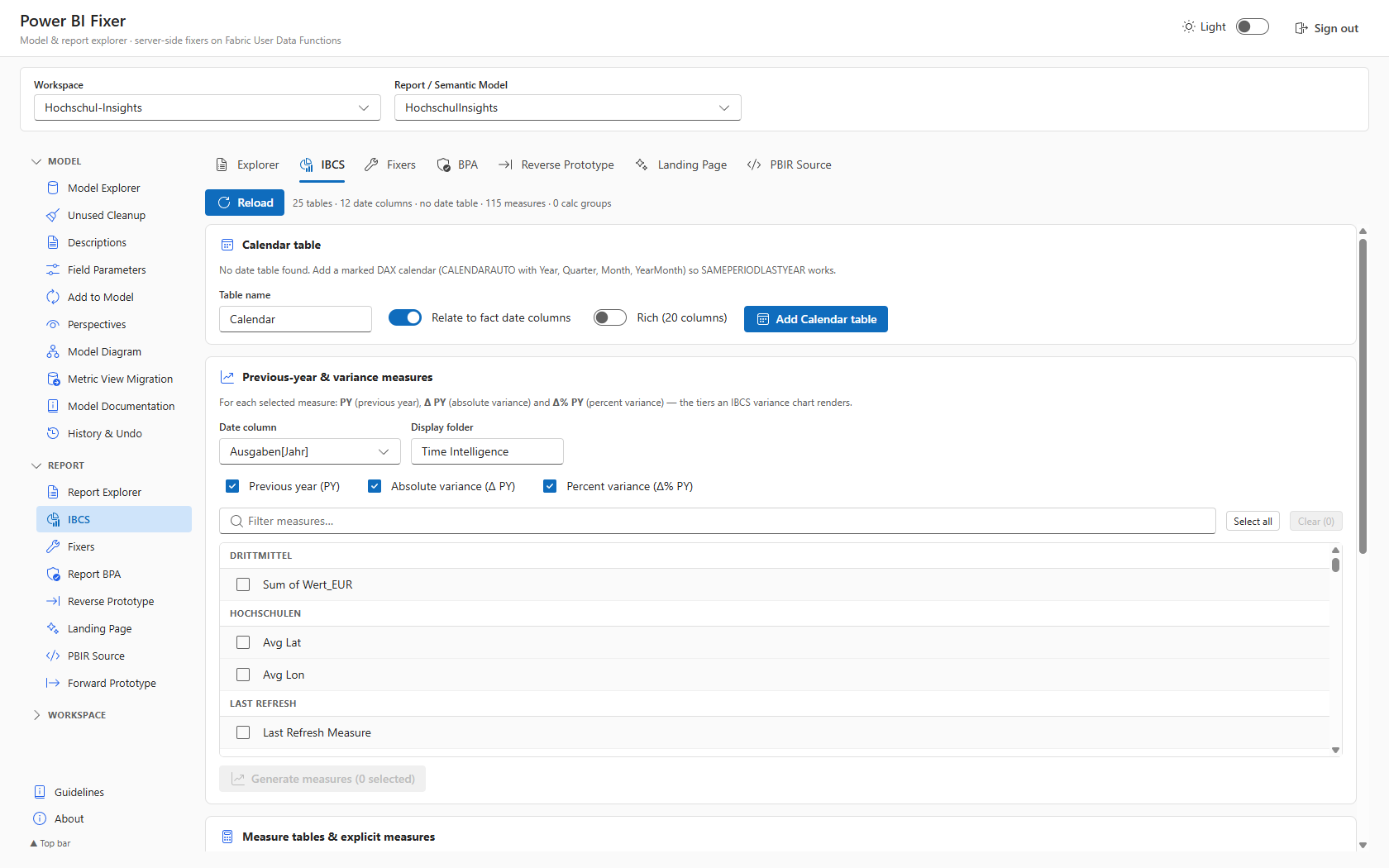
IBCS builder generating previous-year and variance measures

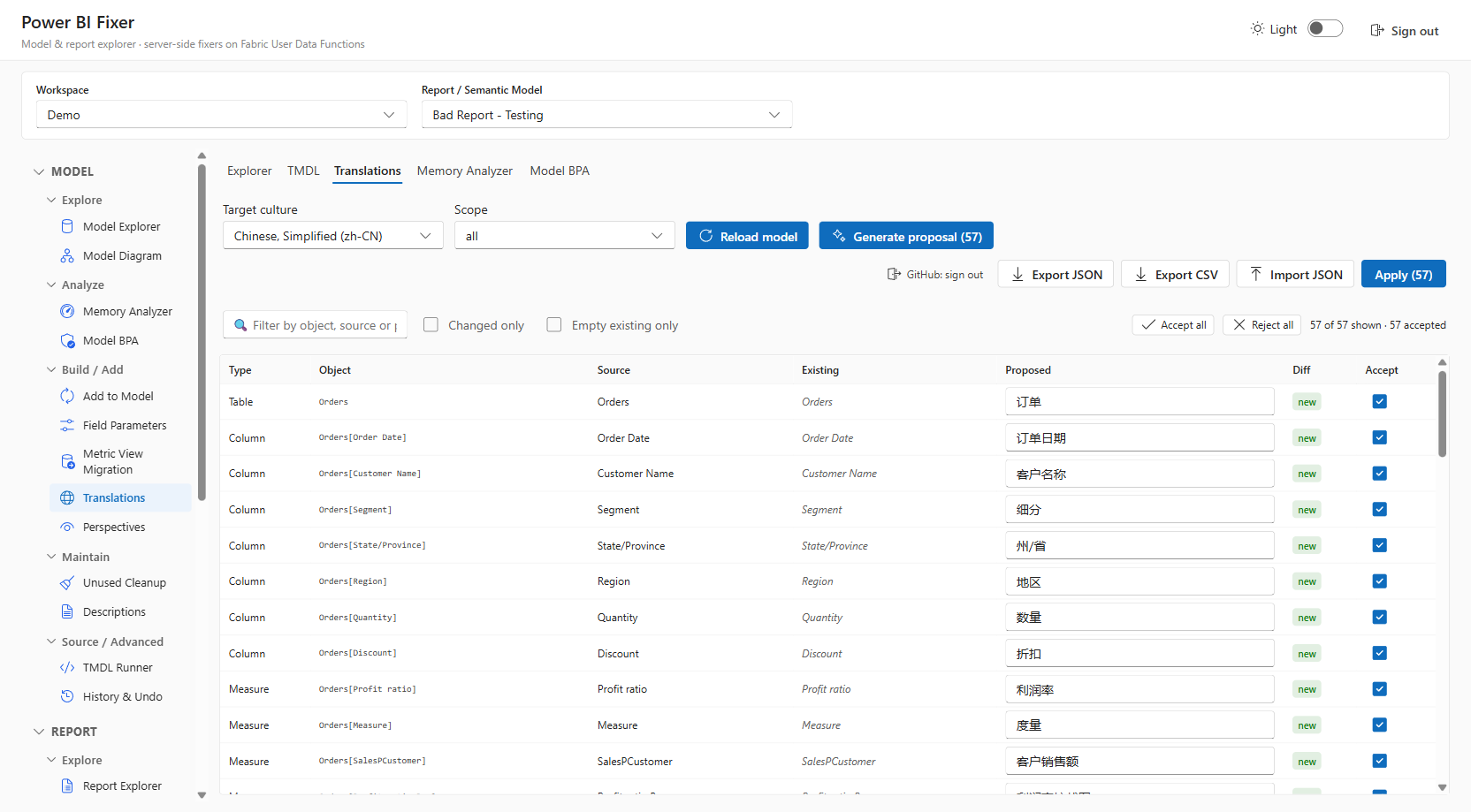
🌐 AI Translations

Generate metadata captions in 11 languages and apply them in one click — powered by GitHub Copilot via a one-time device-flow sign-in.

  • Whole-model culture translations
  • Powered by GitHub Copilot
  • One-time device-flow sign-in
AI-assisted translations generating culture translations for the model

🎛 Field Parameters

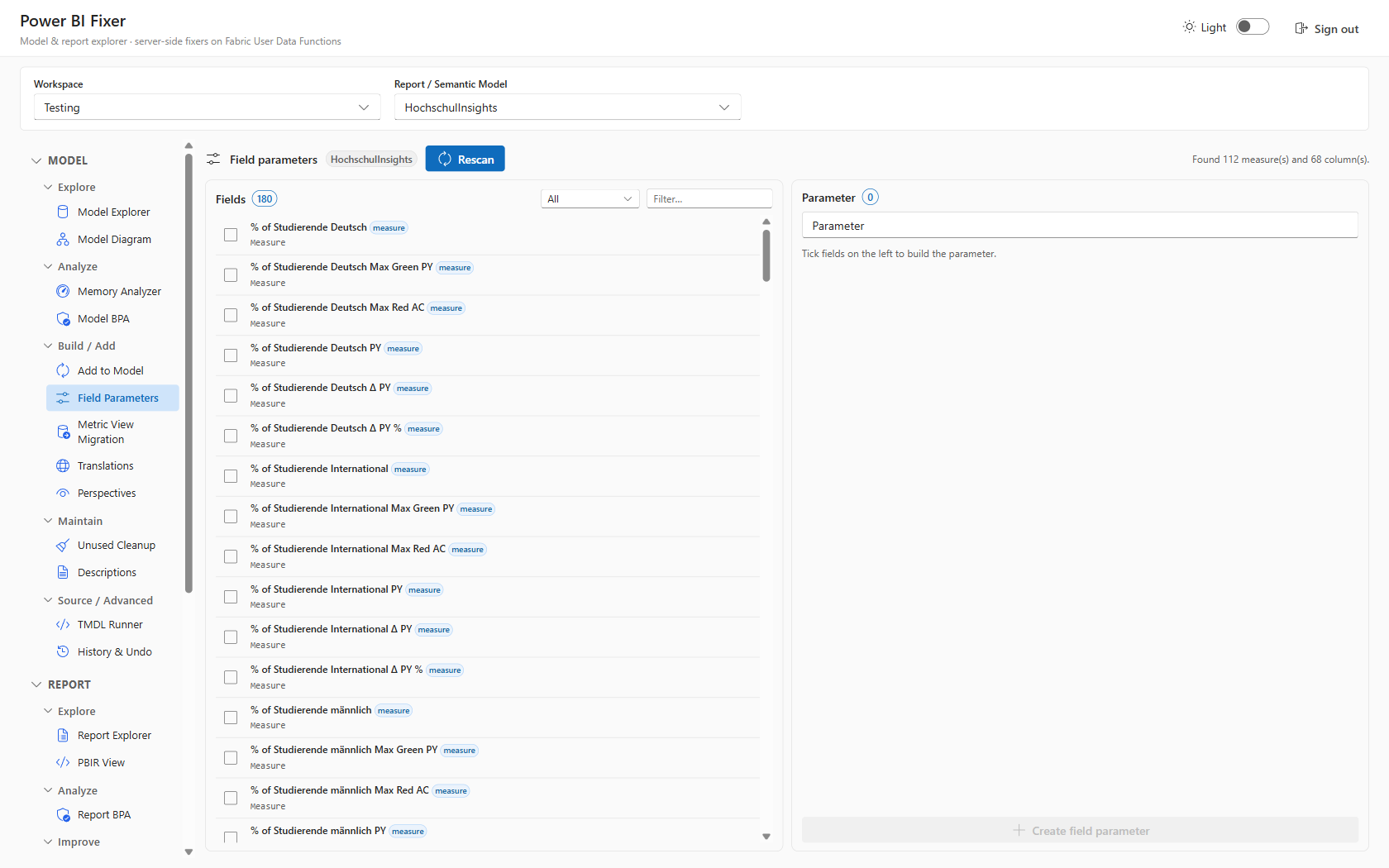
Build slicer-driven measure/column switches without the DAX boilerplate — pick from a list, reorder, and preview the live TMDL.

  • Pick-list of measures & columns
  • Drag-to-reorder fields
  • Live TMDL preview
Field Parameters builder with measure pick-list and TMDL preview

🔍 Perspectives

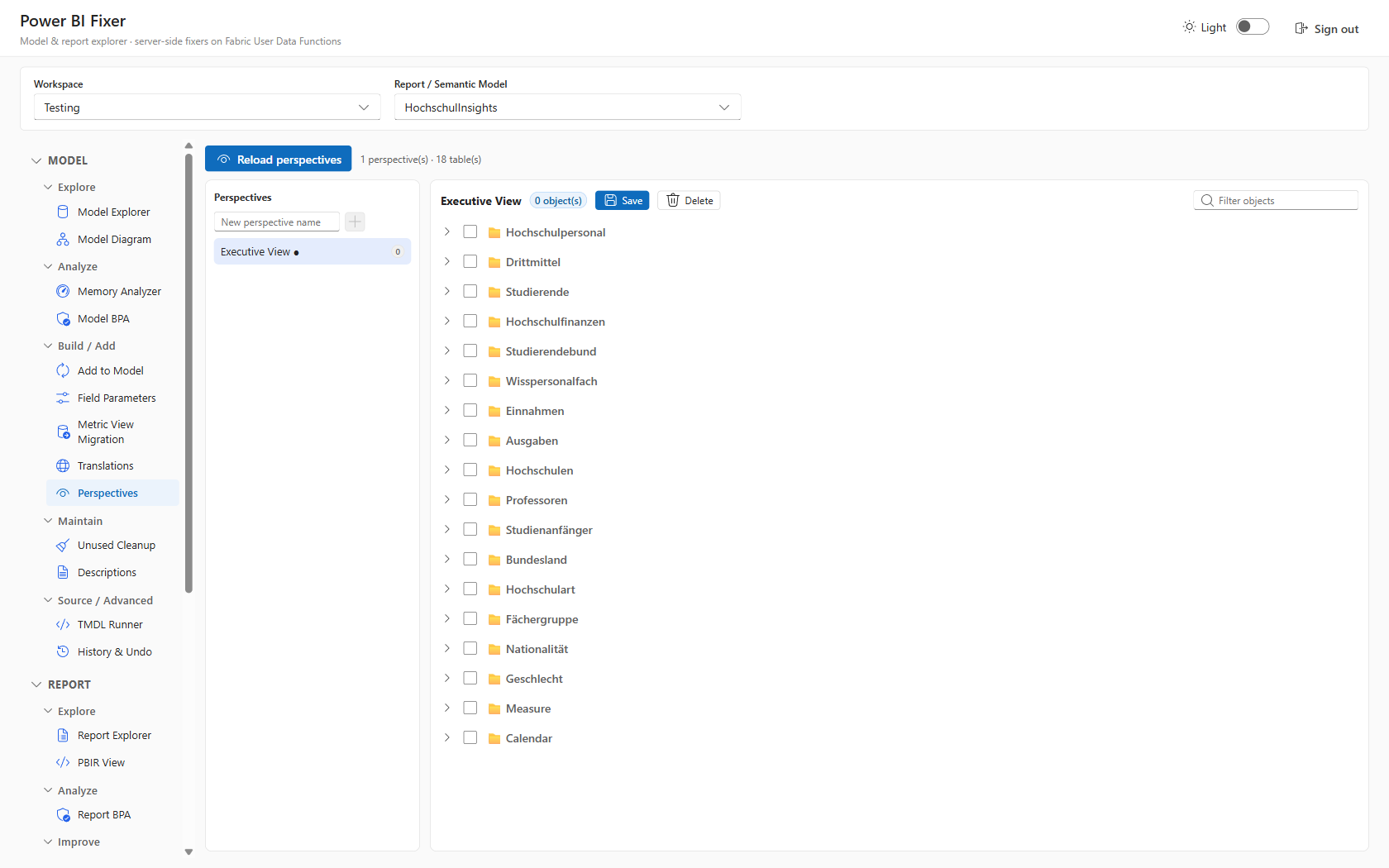
Curate focused subsets of the model for different audiences — tick the tables, columns, and measures each perspective should expose.

  • Tri-state table / column / measure tree
  • Multiple perspectives per model
  • Live TMDL preview
Perspectives editor with tri-state object tree

🌙 Model Explorer — Dark Theme

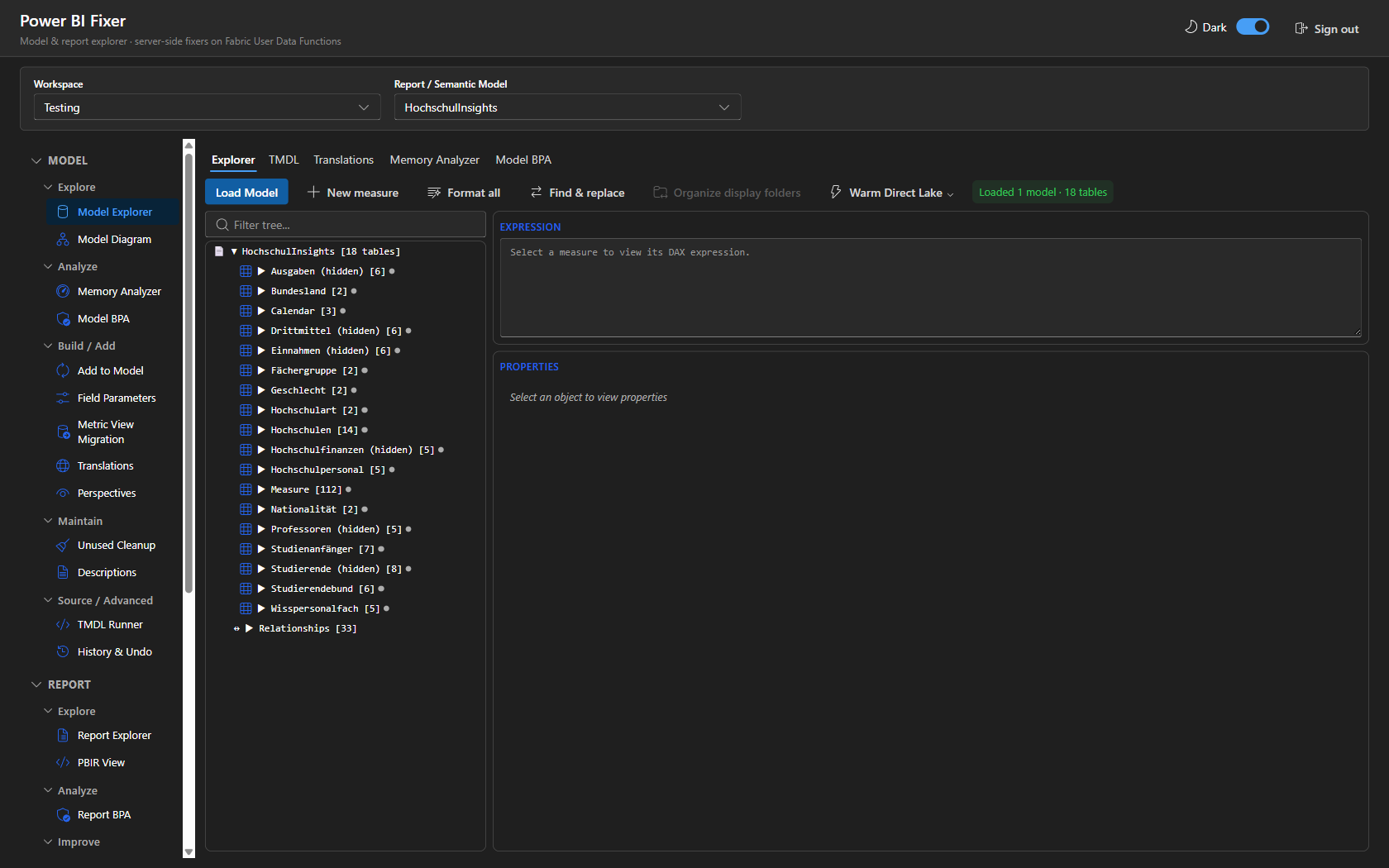
The same modelling workbench in dark mode, with the full object tree, expression pane, and properties panel.

  • Full Fluent UI dark theme
  • Object tree & expression pane
  • Live properties panel
Model Explorer in dark theme

📋 Report BPA

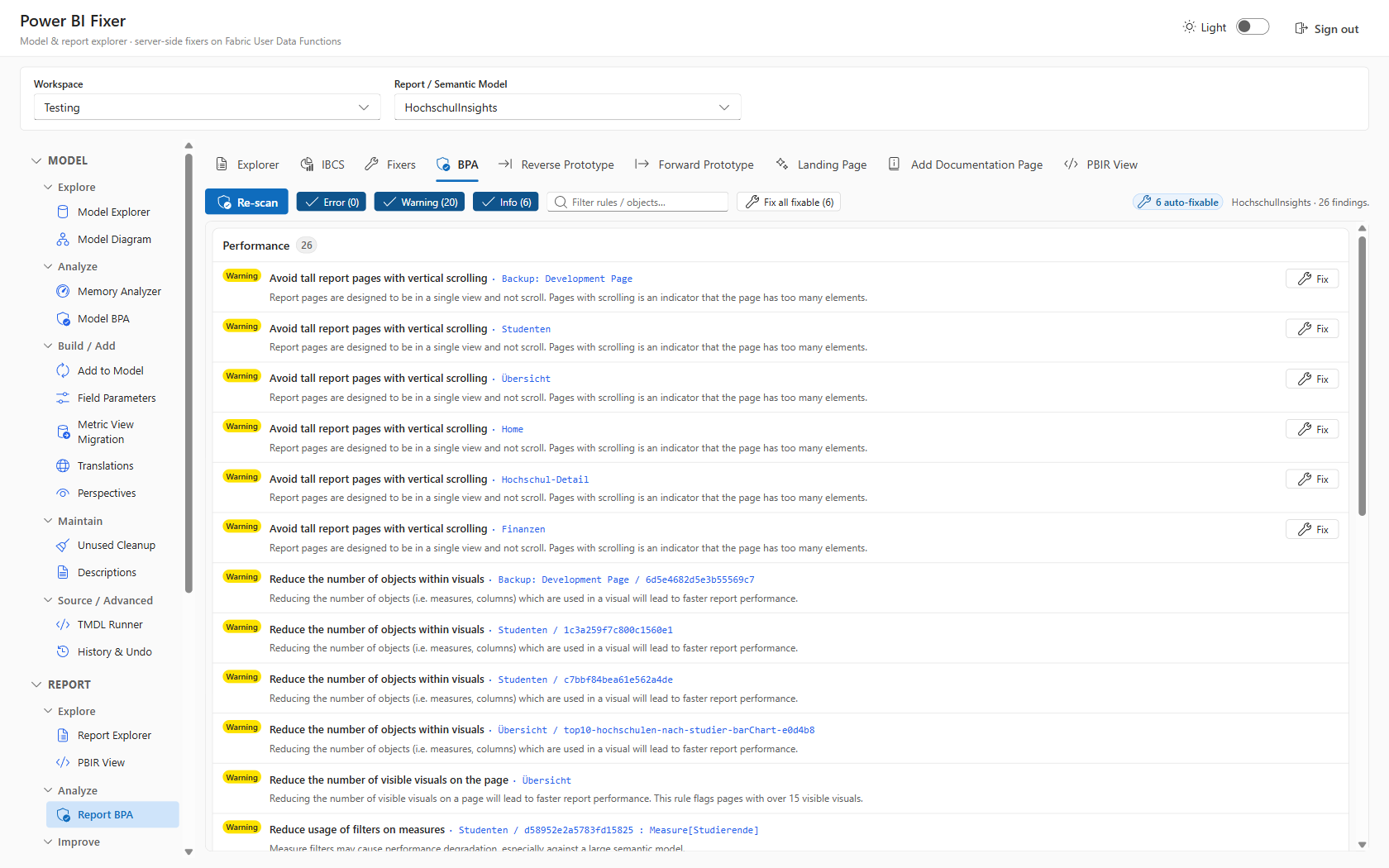
A Best Practice Analyzer for layout and visual hygiene, with Error / Warning / Info severity filters and one-click fixes per finding.

  • Report-layer best-practice rules
  • Error / Warning / Info filters
  • One-click fixes per finding
Report Best Practice Analyzer with severity filters

🛠 Report Fixers

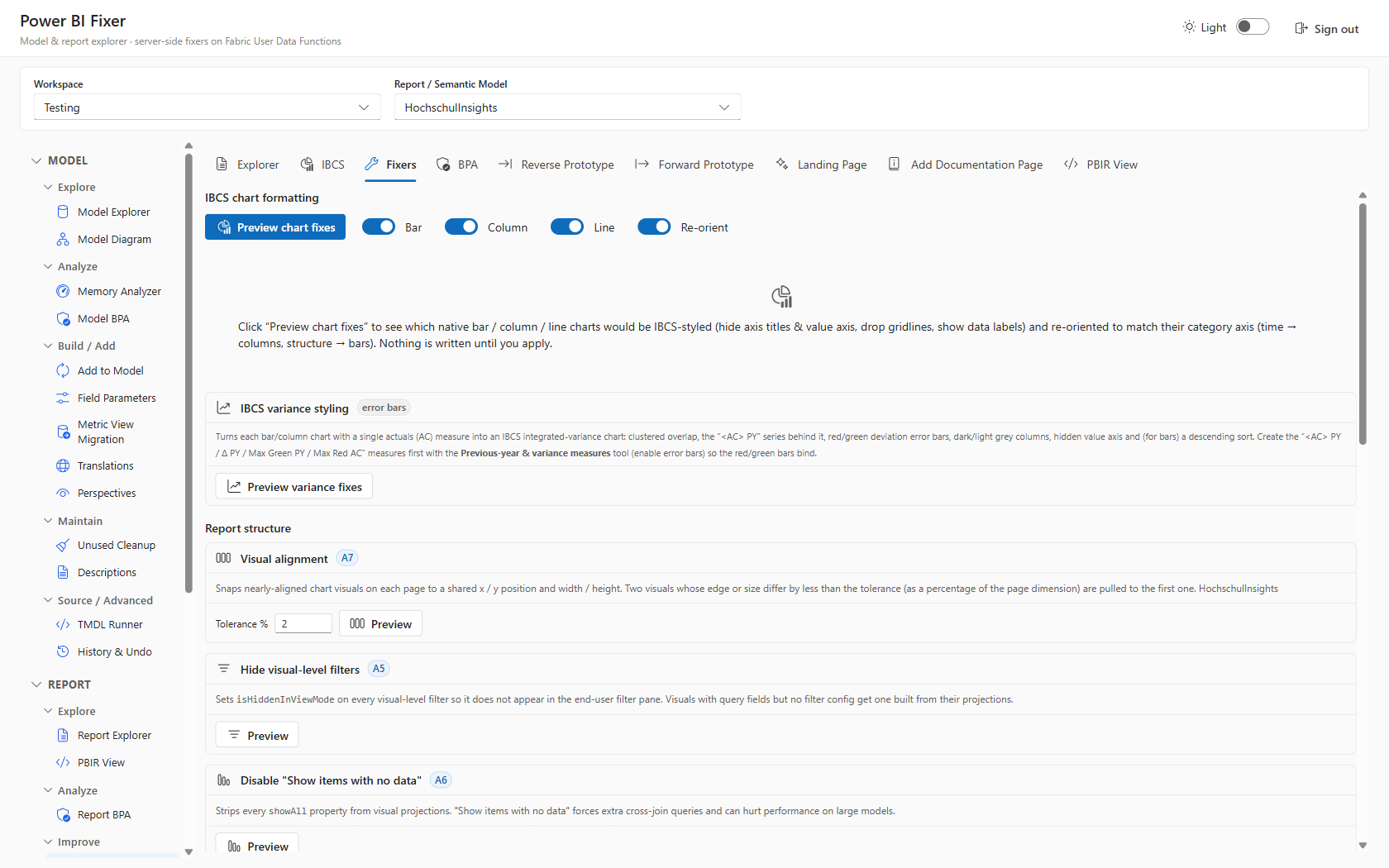
Batch corrections applied across pages and visuals — IBCS chart formatting, variance styling, and report-structure clean-up straight to the PBIR.

  • IBCS chart formatting
  • Variance styling
  • Report-structure clean-up
Report Fixers applying targeted PBIR repairs

📊 IBCS Variance Builder

Absolute and relative variance measures, done the IBCS way — add a marked calendar table and generate the previous-year and variance measures that power IBCS variance visuals, with a picker for the base measures.

  • Marked calendar table
  • PY & variance measures
  • Base-measure picker
IBCS Variance Builder with base-measure picker

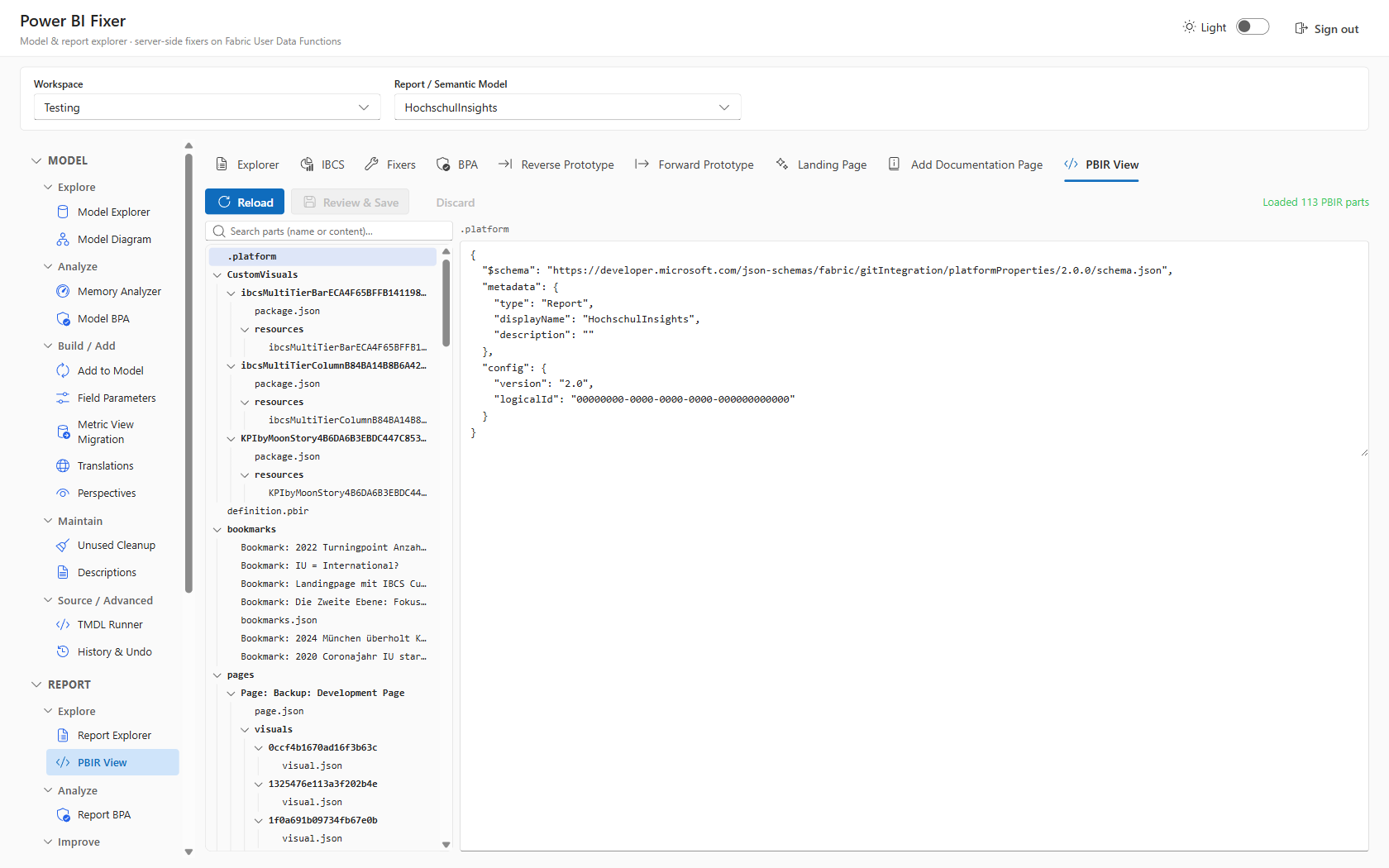
🧾 PBIR View

Inspect the raw enhanced (PBIR) report format — like TMDL view, but for reports — as an editable parts tree with a JSON editor for surgical, low-level changes.

  • Editable PBIR parts tree
  • Inline JSON editor
  • Surgical low-level edits
PBIR View with parts tree and JSON editor

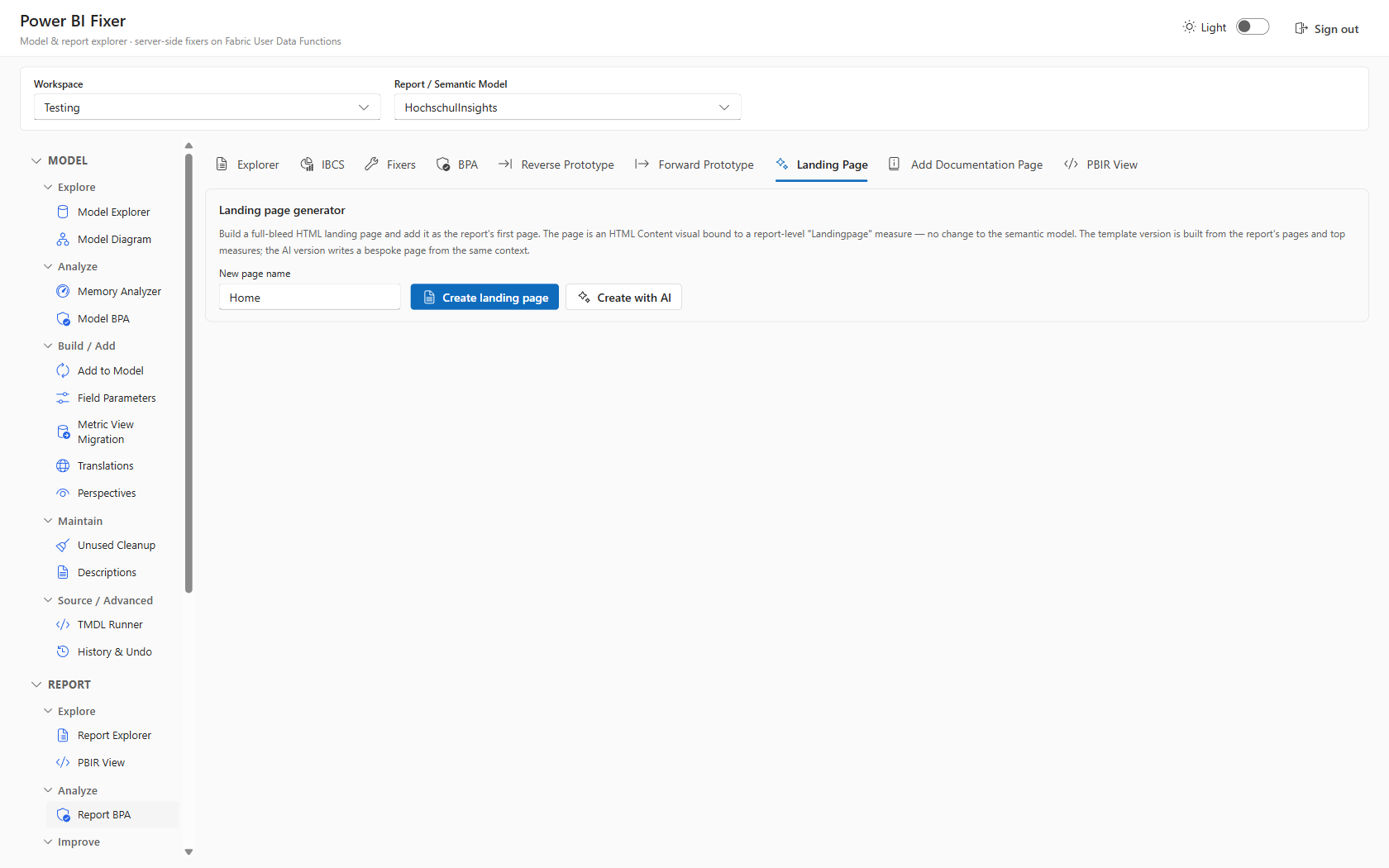
🪧 Landing Page Generator

Generate a polished report landing / navigation page with AI, ready to drop into the report.

  • AI-generated landing page
  • Navigation-ready layout
  • Drop straight into the report
AI Landing Page generator

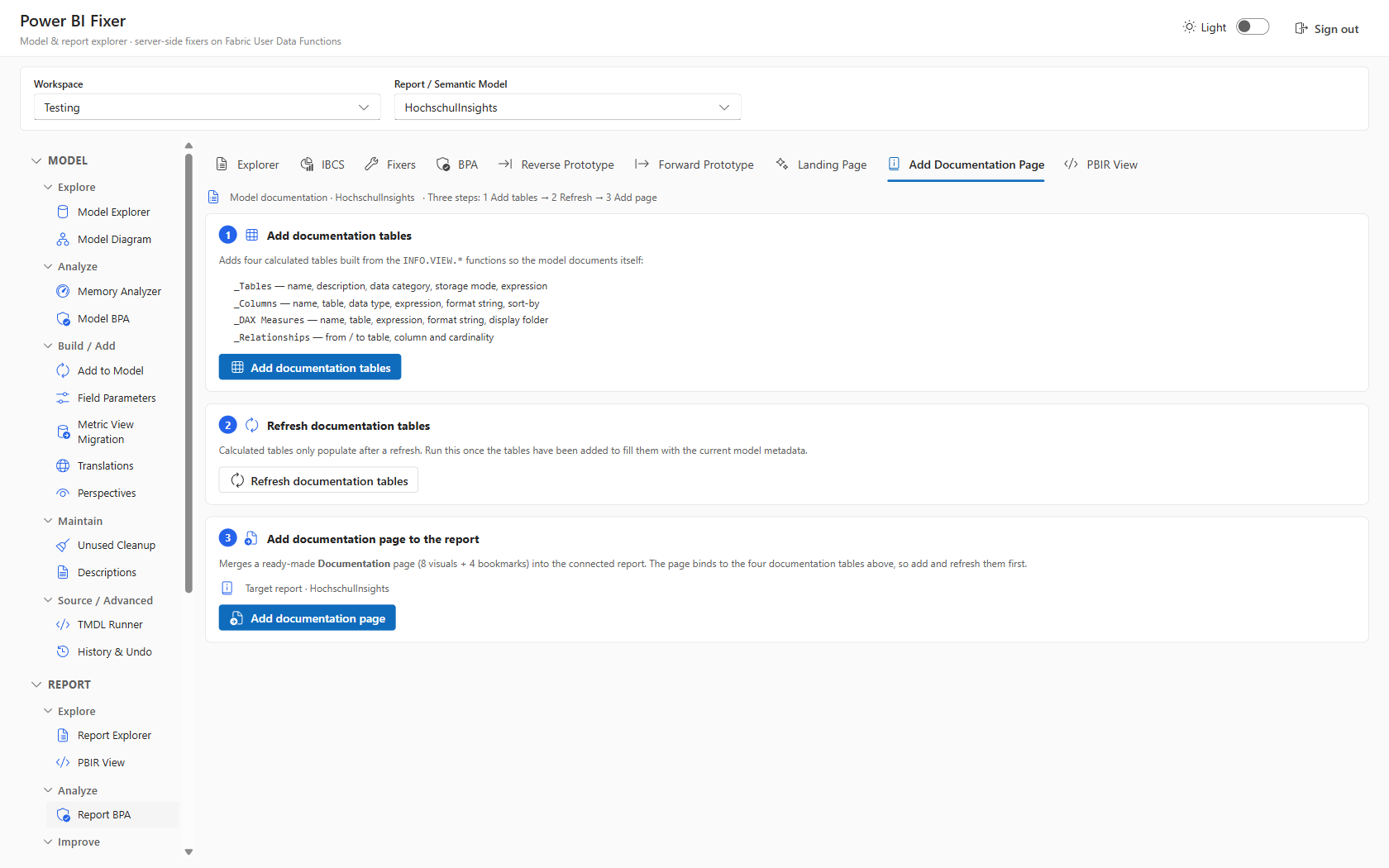
📚 Model Documentation

Auto-generated, share-ready documentation of the whole model — tables, columns, and measures. Original template by Martyn Booth.

  • Whole-model documentation page
  • Tables, columns & measures
  • Guided generation workflow
Model Documentation generator

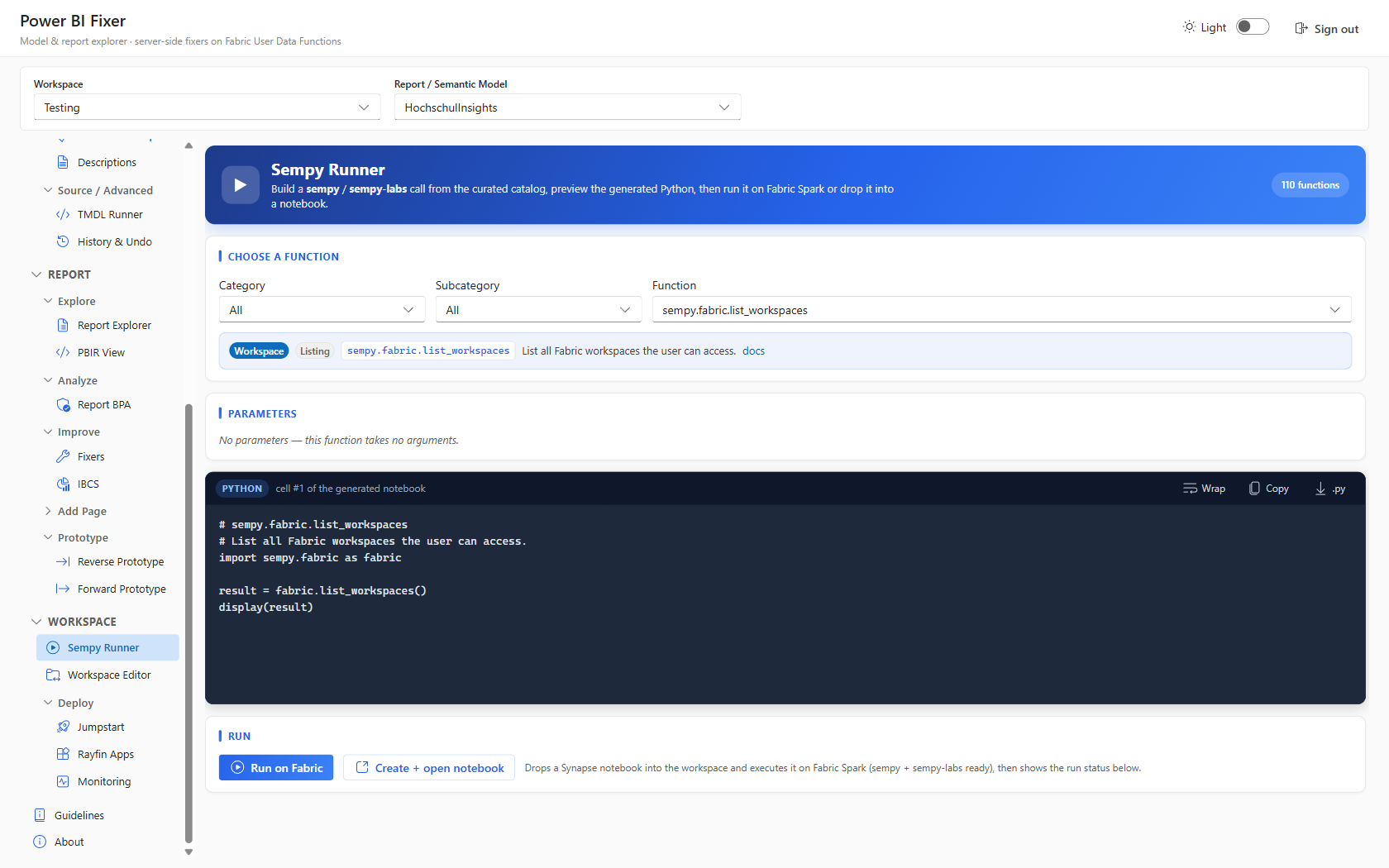
🐍 Sempy Runner

Semantic Link Labs — the hidden champion of Fabric. Build a sempy / sempy-labs call from a curated catalog of 110+ functions, preview the generated Python, then run it on Fabric Spark or drop it into a notebook.

  • Catalog of 110+ functions
  • Generated-Python preview
  • Run on Spark or export to notebook
Sempy Runner with function catalog and Python preview

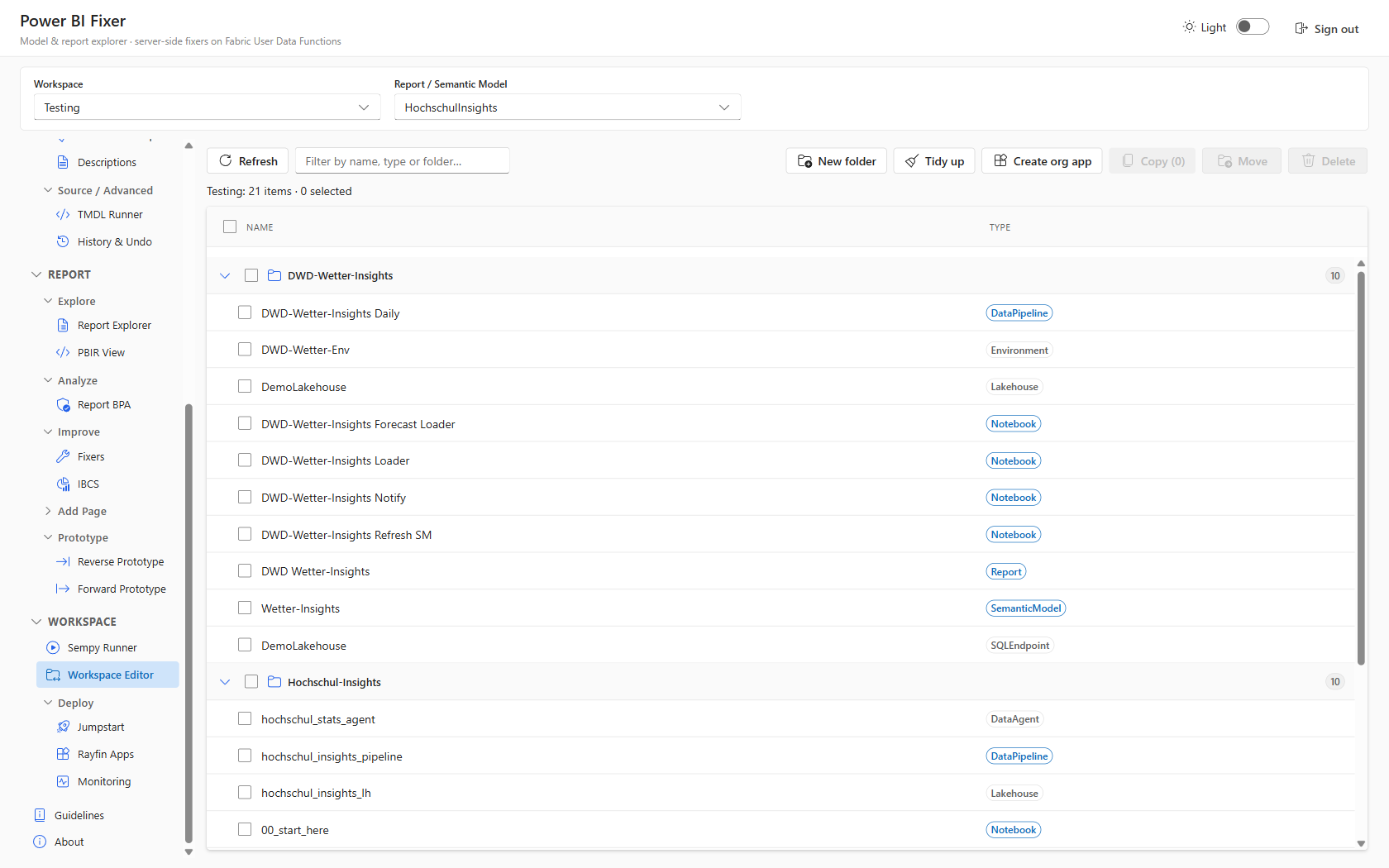
🗂 Workspace Editor

Browse, filter, and organise every item in the workspace, with folder grouping, tidy-up, and one-click org-app creation.

  • Browse & filter all items
  • Folder grouping & tidy-up
  • One-click org-app creation
Workspace Editor with folder grouping

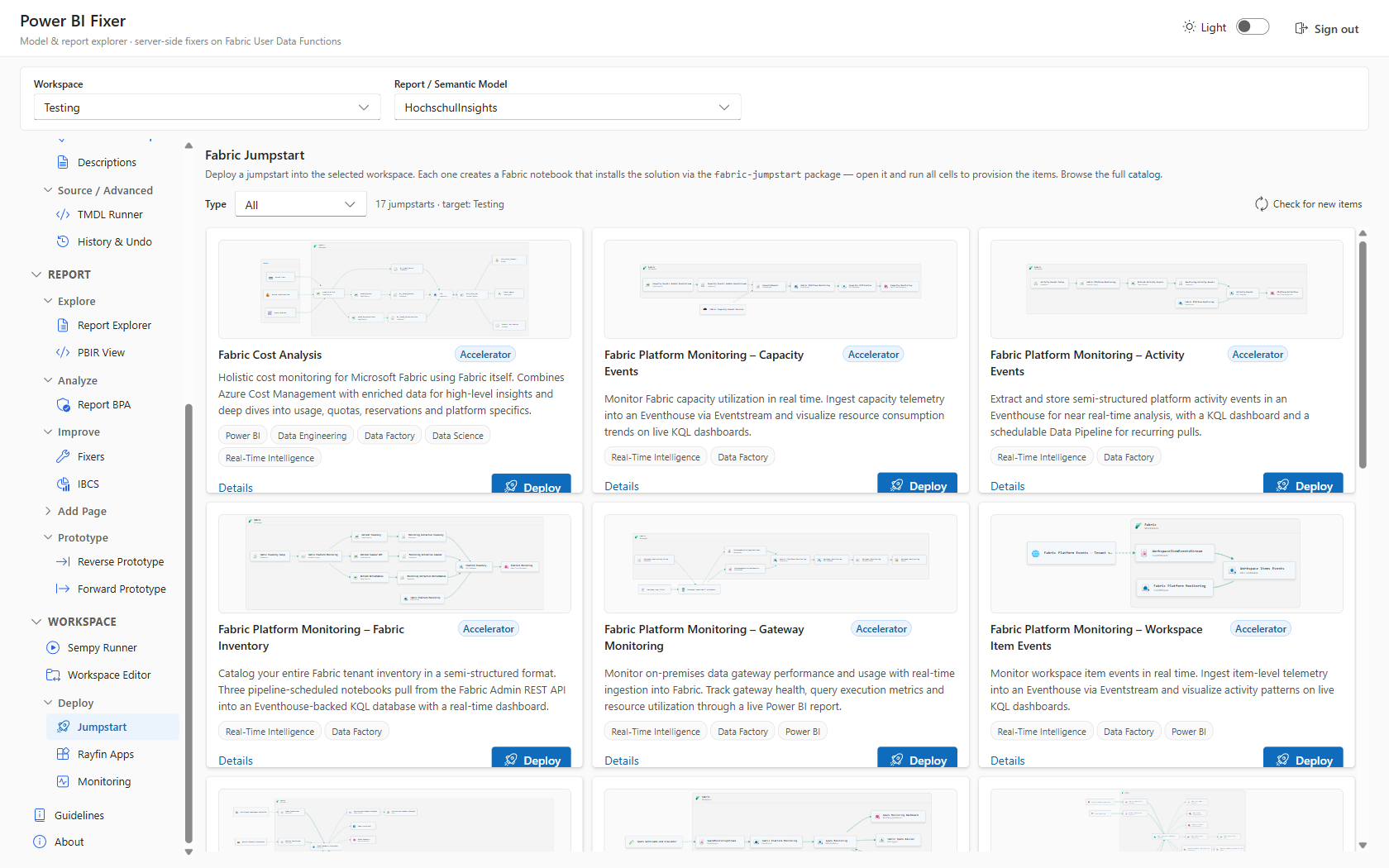
🚀 Fabric Jumpstart

Deploy ready-made Fabric accelerators — cost analysis, platform monitoring, and more — into the workspace as fully provisioned notebooks.

  • Ready-made Fabric accelerators
  • Cost analysis & monitoring
  • Provisioned as notebooks
Fabric Jumpstart catalog

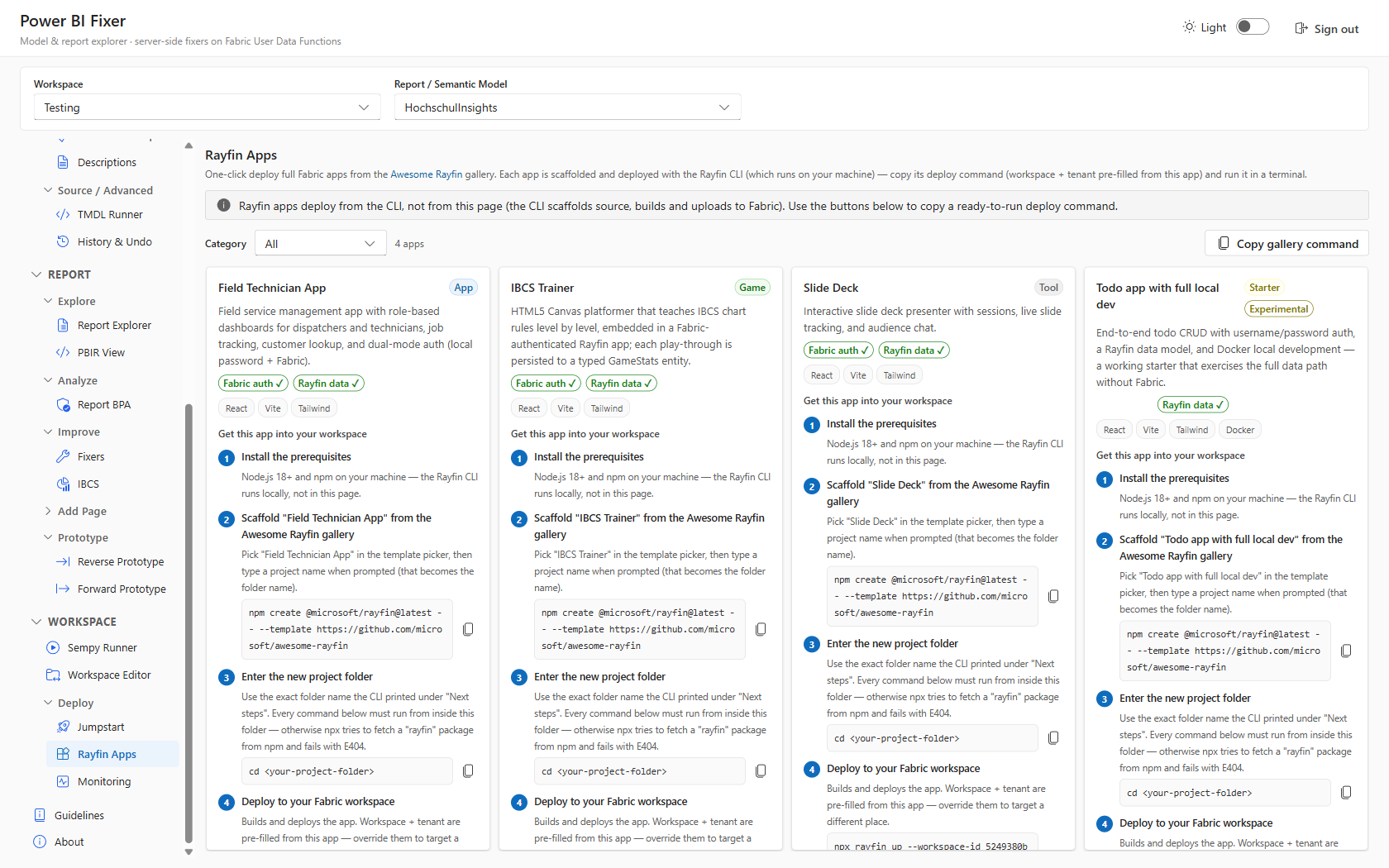
📦 Rayfin Apps

One-click deploy full Fabric apps from the Awesome Rayfin gallery, with a ready-to-run CLI command pre-filled for the selected workspace.

  • Awesome Rayfin app gallery
  • Pre-filled CLI command
  • Deploy to the selected workspace
Awesome Rayfin Apps catalog

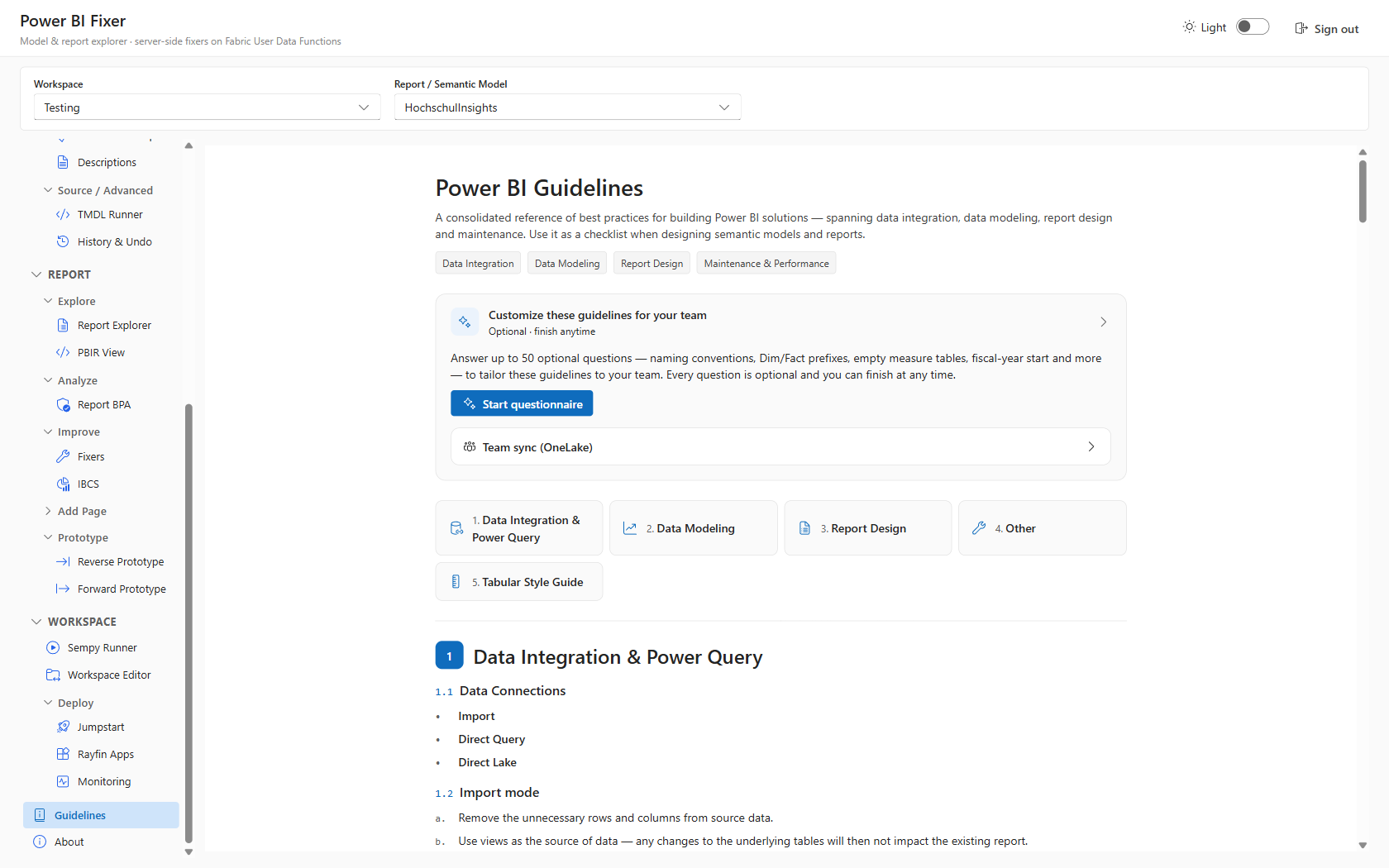
⭐ Power BI Guidelines

A consolidated best-practice reference spanning data integration, modelling, report design, and maintenance, customisable per team.

  • Data integration → maintenance
  • Consolidated best practices
  • Customisable per team
Power BI Guidelines reference

How It Works

The whole thing runs as a single Fabric app item — a React SPA served with brokered Fabric auth, talking to a Python backend.

# React + Vite SPA (Fluent UI v9) ──brokered auth──► Fabric (this app item)
# explorer / pages / components static hosting + auth
# services / udfClient ──────HTTPS invoke──► Python User Data Functions
# list_workspaces
# list_reports
# apply_report_fixer
# fabric_proxy (generic)
# github_device_* / translate
🔒

Tokens Stay Server-Side

The SPA never calls Fabric REST directly — all calls go through the Python fabric_proxy UDF, which holds the on-behalf-of token server-side. That avoids browser CORS and keeps tokens out of the client.

Security
⚙️

Fully Env-Driven Config

No tenant, workspace, or capacity ids are hardcoded in source. Configuration is fully environment-driven, so the same build deploys cleanly across tenants.

Portable

Why a Browser App?

If you maintain enterprise semantic models, you know the workflow: install a desktop editor, connect with XMLA, click through dialogs, export scripts, hope the diff is clean. The Fabric App edition takes a different angle.

🌐

A Browser-Based Modelling Workbench

It needs nothing installed locally and runs on top of your existing Fabric capacity. Sign in with your Fabric identity and start working — no license server, no install footprint, no XMLA endpoint plumbing.

No local install
🧰

Covers the Core Model-Editing Surface

Explore and edit tables, columns, measures, relationships, display folders, descriptions, perspectives, field parameters, and the raw TMDL — everything you rely on from the free desktop editors.

Everyday editing

Adds What Paid Tooling Doesn't

A full report layer (PBIR explorer, diff, one-click fixes), a free IBCS-compliant custom visual, and AI-assisted cleanup for translations, descriptions, and display-folder organisation.

Unique
👥

Built for Teams

Deploy once, share a link. The Team Best-Practice Guidelines & Survey turns individual conventions into a shared, living standard synced to OneLake for everyone who opens the app.

Shared governance

⚠️ Fair warning: The Fabric App edition is in Beta. It extends your workflow rather than replacing your desktop tools. Expect rough edges, and test on a non-production workspace first. Contributions and feedback are welcome.

Get Started in 3 Steps

Deploy the app to your Fabric capacity with Rayfin, then share the link with your team.

1

Get the Template

Grab the Power BI Fixer app template from the Awesome Rayfin catalog.

github.com/microsoft/awesome-rayfin → templates/pbi-fixer
2

Deploy

Sign in and deploy the app as a single Fabric app item:

rayfin up
3

Share & Fix

Open the app, capture your team guidelines, and start editing models & reports in the browser.

View the Project on GitHub →

Requirements

Microsoft Fabric

F or P capacity to host the app item

🐍

User Data Functions

Python backend (the Fabric proxy)

🐙

GitHub Copilot

Optional — for the AI cleanup features

📄

PBIR Format

For report fixes (auto-convert available)

🌍 Check region availability first. Fabric Apps (the workload this edition runs on) are not yet available in every capacity region. Before you deploy, confirm that the Fabric Apps workload is supported for your capacity's region in the official Fabric region availability list.

Open Source & Credits

This tool would not exist without two people.

Michael Kovalsky

For showing me that something like this is even possible with Rayfin — the spark for the whole project — and for Semantic Link Labs.

Lukasz Obst

With whom I started this tool. Whenever you see AI infused into PBI Fixer, it is most likely thanks to him.

Rayfin

Brokered Fabric auth + static hosting — so the whole thing runs as a single Fabric app item with a Python backend.

Built With

React, Vite, Fluent UI v9, Python User Data Functions, and Microsoft Fabric.